
How to Fix a Messy ClickUp Workspace

To fix a messy ClickUp workspace, work in this order: audit what’s actually being used, archive everything that isn’t, rebuild the hierarchy around how work really flows, standardize statuses and custom fields, turn repeat work into templates, then give one person ownership of the system and set weekly habits so it stays clean. Resist the urge to add more. Most messy workspaces need less.
If your team has stopped trusting what’s in ClickUp, that’s the real problem to solve. The steps below are how we approach a ClickUp cleanup.
Audit
See what’s actually used in the last 60-90 days.
Archive
Move dead work out of the way. Don’t delete it.
Rebuild the hierarchy
Structure it around how work really flows.
Standardize
One set of statuses per type of work. Fewer fields.
Template
Turn repeat work into one version of each template.
Own it
One system owner plus weekly habits.
Why ClickUp Workspaces Get Messy
Nobody builds a messy workspace on purpose. It happens one reasonable decision at a time: a new Space for a new client, a custom field someone needed once, a status a team lead added, a template that got copied and edited until there were five versions of it.
Common signs:
People ask “where does this go?” more than once a week.
The same kind of work lives in three different places.
Statuses mean different things on different Lists.
Nobody trusts the dashboards, so they build their own spreadsheets.
Work happens in Slack or email and gets logged in ClickUp later (or never).
Step 1: Audit What’s Actually There
Before changing anything, get a clear picture. List your Spaces, Folders and Lists, and mark which ones had real activity in the last 60-90 days. Note every custom field and status, and who uses them.
A faster starting point: run the free ClickUp Workspace Grader. It connects read-only, scans your workspace in about 2 minutes, and shows you where the biggest problems are.
Step 2: Archive What’s Dead
Archive (don’t delete) anything with no activity that isn’t reference material: old client Folders, abandoned Lists, test Spaces, duplicate templates. Archiving keeps the history but takes it out of everyone’s way.
This is usually the fastest win. A workspace with half the clutter feels twice as usable before you’ve redesigned anything.
Step 3: Rebuild the Hierarchy Around How Work Flows
This is the step that fixes the root cause. A structure that works for most agencies:
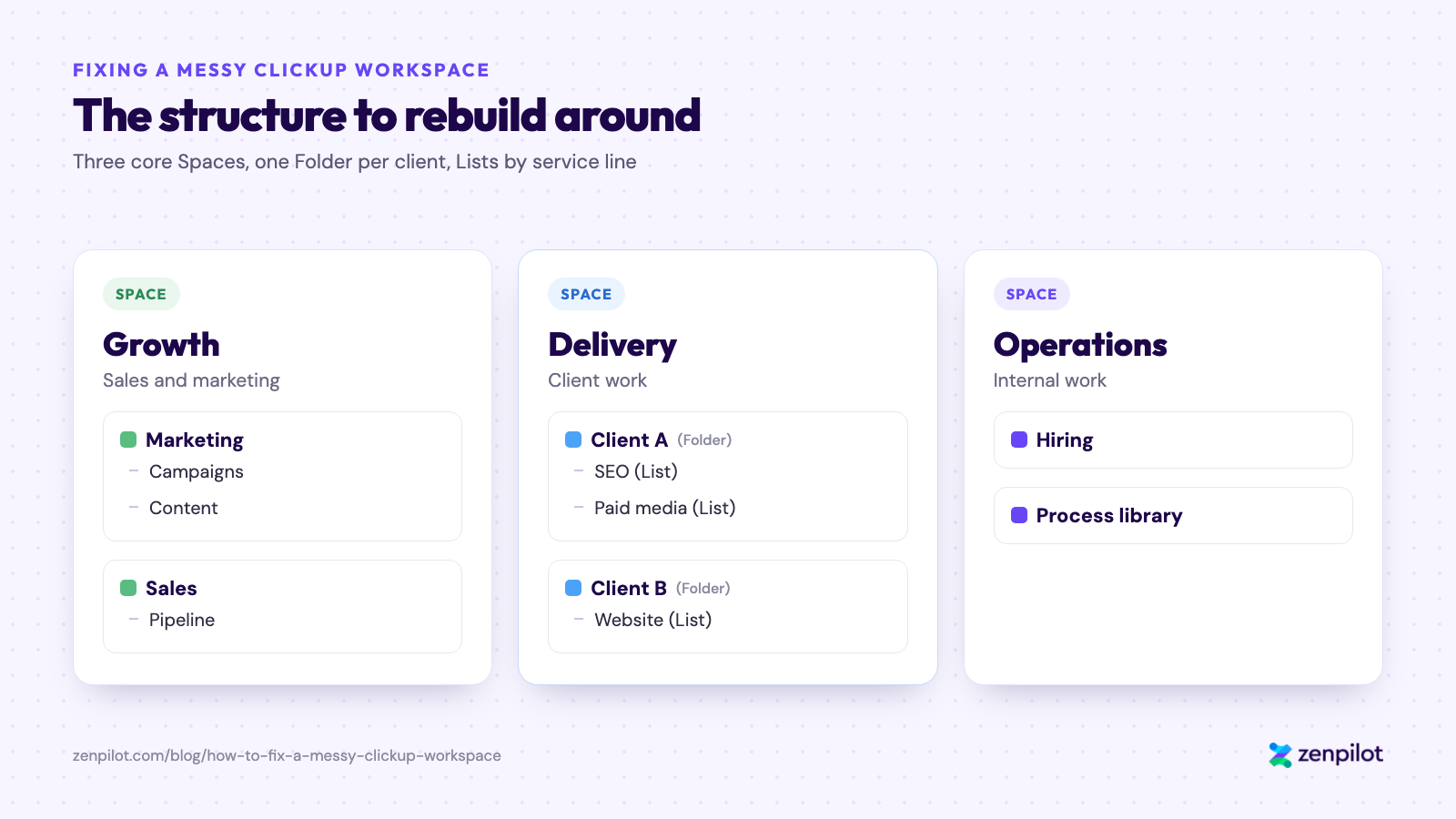
Three core Spaces, one Folder per client, Lists by service line.
We walk through it in detail in The Best ClickUp Hierarchy for Agencies. If your team isn’t an agency, the principle still holds: the structure should match how work actually moves through your business.
Step 4: Standardize Statuses and Custom Fields
Pick one set of statuses per type of work and use it everywhere that work lives. Then cut custom fields down to the ones that drive a decision, a view or a report. If nobody filters, sorts or reports on a field, it’s noise.
Step 5: Turn Repeat Work Into Templates
Anything your team does more than a few times should be a template, with the process built into it (checklists, subtasks, due dates, assignees). That way the process lives where the work gets done instead of in a doc nobody opens. One version per template. Delete the copies.
Step 6: Give It an Owner and Set Weekly Habits
Workspaces drift without an owner. Name one person who owns the system, approves new Spaces and fields, and keeps templates current.
Then set a few shared habits: if it’s not in ClickUp, it didn’t happen; due dates are how work gets prioritized; and each team reviews its open work weekly. Our methodology covers these in more detail.
Fix Your ClickUp Workspace or Start Over?
Most workspaces can be fixed in place. Starting over makes sense when the hierarchy is so tangled that moving work is harder than rebuilding, or when you’re also changing how the team works (new services, a merger, a restructure). Either way, do the audit first so you know which situation you’re in.
What to Do When ClickUp Feels Too Complicated
Sometimes the workspace isn’t that messy. It just feels like too much. That’s fixable, and it usually comes from a few places:
- Every ClickApp, view, and custom field is turned on, so people see 40 options when they need 4.
- There’s no clear hierarchy, so nobody knows where things go.
- Everyone uses it a little differently.
- The team got trained on features instead of on how your team works.
Quick wins you can do today
- Turn off the ClickApps you don’t use.
- Cut each List down to the views people actually open (List, Board, and Calendar cover most teams).
- Hide or delete custom fields nobody fills in.
- Get statuses to something short and consistent (5-7 is usually plenty).
- Take admin access away from everyone who doesn’t need it.
Keep the learning curve short
- Train on 3-5 core actions, not every feature: find your work, update a status, log time, comment, and create a task the right way.
- Write a one-page “how we use ClickUp” doc and pin it.
- Give one person ownership (the same owner from Step 6), so questions have somewhere to go.
- Roll out to one team or workflow first, then expand.
Add complexity back only when the team asks for it. If people are working around something, that’s the sign. Our ClickUp training goes deeper on getting a team comfortable.
FAQ
How do I clean up my ClickUp workspace?
Audit what’s actually being used, archive everything that isn’t, rebuild the hierarchy around how work flows, standardize statuses and custom fields, turn repeat work into templates, and give one person ownership of the system with weekly habits to keep it clean.
Should I start a new ClickUp workspace instead of fixing the old one?
Usually not. Most messy workspaces can be fixed in place by archiving dead work and rebuilding the hierarchy. Starting fresh makes sense when the structure is too tangled to untangle or the way your team works is changing at the same time.
Why does ClickUp feel so complicated?
Usually because too much is turned on at once: every ClickApp, lots of views and custom fields, and no clear hierarchy. Turn off what you don’t use, simplify the hierarchy, and train the team on 3-5 core actions instead of every feature.
How do I reduce the ClickUp learning curve for my team?
Train on a handful of core actions, write a one-page “how we use ClickUp” guide, give one person ownership of the system, and roll out to one team before the whole company.
Who can help rebuild a messy ClickUp workspace?
ClickUp Solutions Partners do this kind of rebuild. ZenPilot is ClickUp’s highest-rated Solutions Partner and a Diamond Solutions Partner, and focuses on agencies of 20-100 people. Our Blueprint is the design phase: we assess your current workspace and design what it should look like, with a money-back guarantee.
Is there a free tool to audit a ClickUp workspace?
Yes. The ClickUp Workspace Grader from ZenPilot is free, connects read-only, and grades your workspace in about 2 minutes.
Want Help Cleaning It Up?
If you’d rather not untangle it alone, book a short call and walk us through your workspace. We’ll tell you what we’d fix first, whether or not you work with us. Book a call.