
ClickUp Onboarding: How to Get Your Team to Actually Adopt It

How do you get your team to actually adopt ClickUp? Get an executive sponsor who uses it first, map your process before you build anything, launch with one pilot team instead of everyone at once, train people on your Workspace (not generic ClickUp), and run weekly rhythms for the first 90 days that measure whether people are really working in it. The rest of this guide walks through each piece.
Most teams that bring ClickUp into their business never get the value they were promised.
It isn’t because ClickUp is a bad tool. The rollout gets treated like a software install, when it’s really a change in how your team works together.
Over the last 10+ years, we’ve worked with 3,100+ clients at ZenPilot. We’ve watched teams transform their operations, and we’ve watched teams quietly drift back to old habits. The setup is the easy part. Onboarding the people is the hard part.
This guide is about the hard part. Setup is covered in our Ultimate Guide to Using ClickUp. Below is the adoption playbook: the pre-launch work, the launch, and the first 90 days that decide whether your team lives in ClickUp a year from now or goes back to Slack threads and spreadsheets.
The 3 Types of ClickUp Onboarding
When people search for “ClickUp onboarding,” they usually mean one of three things. This guide focuses on the first one.
Onboarding your team to ClickUp
You’re adopting the tool and need everyone using it well. It fails most often, so it’s what this guide covers.
This guideOnboarding new employees in ClickUp
ClickUp as your people ops system. Start with ClickUp’s Employee Onboarding Template and our agency setup guide.
Onboarding new clients in ClickUp
Running client onboarding in ClickUp. Grab the free Client Onboarding Template and ClickUp for Clients.
Already on ClickUp? Grade Your Workspace
Connect ClickUp and get a free graded report on on-time delivery, forecasting accuracy, and teamwork. Read-only, about 2 minutes, no email required.
Grade My Workspace →Why Most ClickUp Onboardings Fail
Most ClickUp onboardings fail quietly. The tool gets set up, the team gets trained, and three months later usage has collapsed. People are back in email, the licenses are still being paid for, and nothing actually changed.
We’ve seen the same five failure modes over and over. If you’re about to roll out ClickUp, or you’re in the middle of a rollout right now, check your project against these.
No executive sponsor
Leadership isn’t visibly in ClickUp.
No pilot
Everyone switches on the same Monday.
Tool-first thinking
Configuring before the process is agreed.
No change management
Old habits win by default.
No success metrics
Adoption checked by feel.
Failure Mode 1: No Executive Sponsor
If the CEO or COO isn’t visibly using ClickUp, nobody else will either. This is the single biggest predictor of whether a rollout sticks.
When leadership runs meetings out of Slack threads and email chains while telling the team to “get everything into ClickUp,” the team reads the real signal: this isn’t how we actually work.
The CEO doesn’t have to become a ClickUp power user. They do have to run their meetings from a dashboard, comment on tasks instead of replying in email, and ask “is this in ClickUp?” when someone brings them a problem. Each of those tells the team this is how the company operates now.
Failure Mode 2: No Pilot
Too many teams launch ClickUp across the entire company on day one. Everybody gets trained at once, gets the new hierarchy at once, and is expected to switch on the same Monday.
This never works. The people who need help can’t get it because the support team is also learning the tool. The early bugs in your setup hit everyone at once, which amplifies resistance. And you lose the chance to iterate on real usage before rolling it out company-wide.
Pilot with one team first. Fix what doesn’t work. Then expand.
Failure Mode 3: Tool-First Thinking
This one is especially common in teams that are excited about the tool. The reasoning goes: “We have ClickUp now, so let’s figure out how to use it.” Then they spend three weeks designing the perfect Workspace for a process nobody has agreed on.
ClickUp reflects how your team works. If the work isn’t clear, no amount of configuration will fix it. If your delivery process is “whatever the account manager decides,” the ClickUp setup will be “whatever the account manager decides, plus custom fields.”
Fix the process first, even if it’s rough. Then build ClickUp around it.
Failure Mode 4: No Change Management
Your team has a ten-year habit of email, Slack, and Google Docs. You’re asking them to break it because someone decided ClickUp would be better for the company.
If you launch without actively managing that transition, the habit wins. The team has real work to do today, and they’ll do it the way they already know how. You can’t out-train a habit with a one-hour onboarding session.
Change management means making the new way easier than the old way, building scaffolds that catch people when they fall back, and getting visible, repeated reinforcement from leadership for months.
Failure Mode 5: No Success Metrics
If you can’t tell whether the rollout is working, you can’t fix it when it isn’t. Most teams launch ClickUp and then check adoption by feel. “Are people using it? I think so? Kind of?”
By the time someone notices that half the team has drifted back to email, you’ve lost the momentum to bring them back.
Before you launch, decide what “adoption” means and how you’ll measure it: daily active users, percentage of tasks updated in the last 7 days, percentage of client work run from a ClickUp Folder. Pick two or three metrics, baseline them in week one, and review them every week for the first 90 days.
The 4 Phases of a Successful ClickUp Onboarding
Every successful rollout we’ve led has the same four phases. Skipping any of them is how you end up in one of the failure modes above.
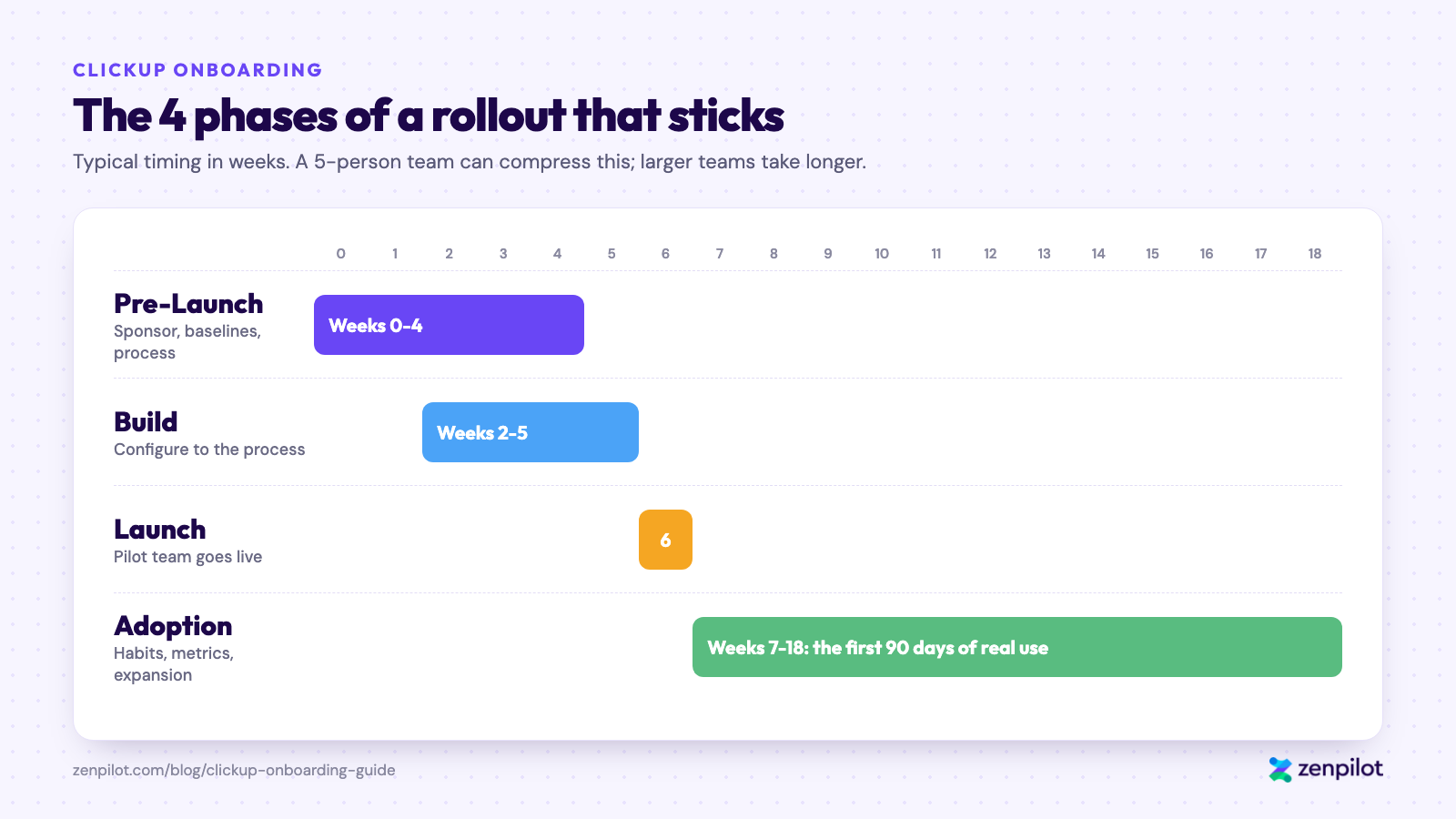
Typical timing. Pre-Launch and Build overlap; Adoption is the longest phase.
The exact timing varies by team size and complexity. A 5-person team can compress this to 4 weeks total. A 50-person agency doing this right usually takes 60 to 90 days. The calendar matters less than doing all four phases in order.
Phase 1: Pre-Launch (the Work Most Teams Skip)
This phase separates rollouts that stick from rollouts that collapse. It’s also the one most teams skip because they want to “just get started with the tool.”
Get Executive Sponsorship on Day One
Before anything else, get a clear commitment from the top. The CEO, COO, or department head running this rollout needs to commit, out loud, to three things:
The executive sponsor commits to:
- Personally using ClickUp as their primary work hub during and after the rollout.
- Reinforcing ClickUp usage in meetings for the first 90 days.
- Not undercutting the rollout by accepting work via other channels (“just Slack me”).
Without those three commitments, everything downstream is at risk. We won’t start a ZenPilot Blueprint without them.
Define What Success Looks Like
Write down what a successful rollout looks like 90 days from launch. Be specific.
”90 days after launch, every client project is being run from a ClickUp Folder. The weekly leadership meeting uses a dashboard. Account managers spend less than 30 minutes a week on status reporting.”
”Everyone is using ClickUp.”
The specific version gives you something to aim at and measure against. The vague version is how rollouts die.
Baseline Your Metrics Before You Start
You’re about to change how the team works. Before you do, capture where things stand today. Some examples:
- How long does it take a new client project to get from kickoff to first deliverable?
- What percentage of projects are delivered on time?
- How much time do managers spend on status meetings per week?
- What’s your utilization rate by team member?
You won’t get all of this perfectly, and a rough baseline is better than none. Without it, you can’t prove the rollout worked, and leadership will lose patience exactly when adoption is most fragile.
For the metrics worth tracking, see our Agency KPIs guide.
Map the Process Before You Build
The most important pre-launch question is “how do we actually work today, and how do we want to work tomorrow?” How to configure ClickUp comes after that.
Pick one or two core workflows (usually your delivery process and your sales-to-delivery handoff). Document them as they actually run right now, with the shortcuts, the exceptions, and the tribal knowledge. Ignore how they should run or what the SOP in Notion says.
Then decide what you want to change. Maybe the handoff should have a required meeting. Maybe status updates should be weekly instead of whenever-we-remember. Get alignment on the process changes before you start configuring the tool.
When you build ClickUp around a process nobody has aligned on, you rebuild chaos with better UI.
Decide on Scope
The last pre-launch decision is the hardest: what goes into ClickUp on day one, and what doesn’t.
The temptation is everything. Client work, internal projects, hiring, onboarding, finance, content calendar, product roadmap, all in ClickUp from the start.
The answer is almost always to start with one or two workflows: the ones with the most pain and the clearest wins. Get those working and adopted. Then expand.
We usually start agencies with client delivery and the sales-to-delivery handoff. That’s where the pain is, and that’s where a working ClickUp setup creates the most obvious value. Everything else comes in later phases. That includes ClickUp’s AI features, which are worth turning on once the core workflows stick but shouldn’t drive your day-one rollout.
The only fully guaranteed ClickUp implementation framework
360 clarity on your operations, or your money back. See exactly what your ClickUp rollout should look like before you commit.
Design My Blueprint →Phase 2: Build
Once the pre-launch work is done, configuration is straightforward. The full tactical guide is in How to Use ClickUp: The Ultimate Guide. A few things matter specifically for onboarding:
Build for the Process You Mapped
Every configuration choice should trace back to something in your process map. If you can’t explain why a custom field exists by pointing to a step in the workflow, don’t add it. If a Space has no home in the process, don’t build it yet.
This is how you keep ClickUp from becoming a collection of unused fields and orphaned Lists.
Make One Person the System Owner
Pick one person to own the ClickUp configuration. A committee or “the leadership team” won’t work.
They don’t have to be the most senior person or the most technical. They have to be accountable for how ClickUp is structured and willing to say no to ad-hoc requests from team members who want their own custom field.
Without an owner, the Workspace will get cluttered within 90 days and become harder to use than the chaos it replaced.
Pick the Right Pricing Plan
Most teams we work with need ClickUp Business at minimum. The Core plan (formerly Unlimited) has gaps that become obvious as soon as you try to run reports or manage permissions at scale. See our guide on how to choose the right ClickUp pricing plan if you’re deciding.
Resist the Urge to Finish
The biggest mistake in this phase is trying to build a perfect Workspace before launching. A Workspace that’s 80% right and in use will get to 95% right faster than one that’s “almost done” and has been in build mode for three months.
When your pilot team can do their actual work in ClickUp, you’re ready to launch. You can keep polishing after.
Phase 3: Launch
Launch week has most of the visible action, but most of what determines success already happened in Phase 1.
Pick the Pilot Team
Don’t launch company-wide. Launch with one team, and pick it carefully. You want a team that meets three criteria:
A real pain ClickUp solves
If they’re fine with their current setup, they’ll resist.
A strong lead who’s bought in
The team lead’s commitment matters more than anything else.
Big enough to prove it
Too small and the lessons don’t generalize. Usually 4 to 8 people is the sweet spot.
For agencies, this is usually one client delivery team, not a service line or a function.
Train on Workflows, Not Features
The goal of training is to get the team confident doing their actual work in ClickUp tomorrow. You don’t need to explain every ClickUp feature.
“Here’s how you kick off a new project” beats “here’s what Custom Fields do.” Walk through real examples with real data, and let people do the clicking themselves.
We usually run two training sessions: a 90-minute kickoff covering the core workflow, and a 60-minute follow-up two weeks in to answer questions after people have tried to use it for real.
Plan Go-Live Day
Go live on a Monday, not a Friday. People have fresh focus on Mondays and a week ahead of them to work through rough spots. With a Friday launch, problems sit over the weekend and the team comes back to a broken experience.
Have the system owner and one or two ClickUp-fluent people available for office hours for the first three days. Set up a dedicated Slack channel for questions. Assume things will break. They will.
The First Two Weeks
These two weeks are the most fragile. If people hit too much friction, they’ll silently drift back to old habits and you won’t know until weeks later.
Three things matter in these two weeks:
Leadership visibility
The executive sponsor runs at least one meeting per week from a ClickUp view. They’re in there, working in the tool, visibly.
Fast fixes
When something is broken or confusing, fix it the same day. The message should be “we’re responsive to what you need,” not “we’ll look at it next sprint.”
Real work only
Resist the urge to add new things to ClickUp yet. The pilot team should be doing their normal work, in ClickUp, for two full weeks before anything else gets added.
Phase 4: Adoption (The First 90 Days)
By the end of launch week, the tool works and the pilot team knows how to use it. The question for the next 90 days is whether they’ll still be using it in month four.
Weekly Rhythms
Without weekly rhythms, the rollout goes quiet and the team drifts back. Three we’ve seen work consistently:
Weekly planning in ClickUp
Every Monday, every team member plans their week by creating and sorting tasks in ClickUp. Not in a separate planning doc or their personal Notion. If they don’t plan there, they won’t work there.
Leadership review from a dashboard
The pilot team lead reviews the week’s dashboard with the executive sponsor every week. The review happens in ClickUp, referencing real data. This makes the tool the source of truth.
Retrospective and fix list
Every week, collect what’s confusing or broken. Fix three things. The compounding effect over 90 days is enormous, and the team sees that their feedback changes the tool.
Measure Every Week
Review the baseline metrics from Phase 1 every week. If adoption metrics are trending up, you’re winning. If they plateau or decline, intervene immediately.
What to watch:
- Active users per day. If this drops below 80% of the team, something’s wrong.
- Tasks updated in the last 7 days. If tasks are getting created but never updated, the team is checking boxes without doing the work in the tool.
- On-time completion percentage. This should improve over the first 60 days if the rollout is working.
When to Intervene
Adoption problems rarely fix themselves. If usage is declining at week 6, it’s almost never “they just need more time.” It’s almost always one of:
- Someone on the team is quietly resisting and pulling others with them.
- The process you built ClickUp around isn’t the process the team actually runs.
- Leadership has gone quiet and people don’t feel the reinforcement anymore.
Diagnose which one it is and fix it directly. Don’t respond by adding more training. If the team knows how and just isn’t doing it, training won’t fix it.
Expanding Beyond the Pilot
When your pilot team hits your adoption metrics consistently for 30 days, you’re ready to expand. Not before.
Expand one team at a time, and use your pilot team as the training ground for the next one. The pilot’s system owner is now your internal expert, and that internal expertise is what scales the rollout.
The 5 ClickUp Adoption Metrics That Tell You It’s Working
For a complete framework, read our Agency KPIs guide. For just the onboarding question “is this working,” watch these five:
If four of five are green at day 90, your onboarding stuck. If three or fewer, something in the four phases didn’t happen and you need to look back.
Common Questions About ClickUp Onboarding
What is ClickUp onboarding?
ClickUp onboarding usually means one of three things: getting your own team to adopt ClickUp, onboarding new employees using ClickUp, or onboarding new clients in ClickUp. This guide covers the first one, which runs in four phases: pre-launch, build, launch, and the first 90 days of adoption.
How long should a ClickUp onboarding take?
For a small team (under 10 people), 4 to 6 weeks end to end. For a 25-person agency, 8 to 12 weeks. For 50+ people, 12 to 16 weeks.
If someone tells you they can roll out ClickUp across a 50-person company in 2 weeks, they’re selling you the setup. The setup can happen in 2 weeks. The adoption cannot.
Do we need a ClickUp consultant to onboard?
You don’t need one to do it. You might want one to do it right the first time.
Teams that self-implement usually succeed when they have (a) a strong internal owner with enough authority to make decisions, (b) enough time to invest without shortcutting Phase 1, and (c) executive sponsorship from day one. If you have all three, you can do this with our Ultimate Guide to Using ClickUp and this guide.
If you’re missing any of them, a ClickUp consultant will save you time and money compared to trying to retrofit adoption after a failed rollout. We’ve watched Gravity Global and many others go through this exact pattern: self-implementation, stall, then full rollout with ZenPilot.
What if our team resists the tool?
Resistance is data. It tells you one of three things: the process the tool is built around isn’t the process they actually run, leadership hasn’t been clear about expectations, or a specific person is leading the resistance and the team is following.
Talk to the resisters one on one, not in a group. Ask them what’s making ClickUp harder to use than what they had before. Usually they’ll tell you exactly what the real problem is. Sometimes it’s a broken field. Sometimes it’s a process disagreement that predates the tool. Fix what they actually need fixed.
Can we onboard just part of the team?
Yes, and you should. The pilot team approach in Phase 3 is exactly this. Start with one team, get it working, then expand.
The trap is permanent partial adoption. If half the company is in ClickUp and half is in email forever, you’ll spend more effort bridging the gap than you saved. Treat a partial rollout as the starting point.
What if we already tried ClickUp and it didn’t stick?
This is one of the most common situations we see. The team tried ClickUp, it faded out, and now leadership is skeptical that any tool can stick.
The second attempt is harder than the first because people remember the last failure. What worked for these teams:
- Acknowledge the first rollout didn’t work, and be honest about why. Don’t pretend it went fine.
- Name what’s different this time. Usually that’s executive sponsorship, a real pilot, or a process commitment that didn’t exist before.
- Pilot with a team that didn’t participate in the first attempt. They don’t carry the baggage.
We’ve helped dozens of teams restart after a failed rollout. What they have in common: the second rollout fixes whatever broke the first one, which is rarely just the tool setup.
How much does ClickUp onboarding cost?
It depends on whether you do it yourself or bring someone in.
Self-implementation costs time. Plan on 40 to 80 hours of your system owner’s time across the four phases for a small team, more for larger ones, plus the productivity dip during the first month as people switch.
Working with a partner like ZenPilot typically starts at $5,000 for the Blueprint (the 4-week operational design phase) and scales from there. Full implementation engagements typically run $15k to $30k depending on size and complexity. See our pricing.
The bigger cost question is whether the rollout works or has to be redone. A failed rollout followed by a correct one costs more than doing it right the first time.
Who can help our team adopt ClickUp?
ClickUp Solutions Partners do rollout and adoption work as well as setup. ZenPilot is ClickUp’s highest-rated Solutions Partner and a Diamond Solutions Partner. We train teams on their own Workspace and coach them through the first months with ongoing support retainers, with a focus on agencies of 20-100 people.
Ready to Get ClickUp Onboarding Right?
The teams that win with ClickUp took the human side seriously: executive sponsorship, real pilots, process clarity before configuration, measured adoption, and weekly rhythms that keep the momentum going.
If you’re about to start your ClickUp rollout and want a partner that’s worked with 3,100+ clients, schedule a free ops strategy call. We’ll walk through your situation and tell you honestly whether you should work with us, do it yourself with our guide, or wait until the prerequisites are in place.
