ClickUp vs Jira: Which Is Better for Agencies and Service Teams?

ClickUp is the stronger choice for agencies. It handles client work, project delivery, docs, and time tracking in one platform without expensive add-ons. Jira is purpose-built for software engineering teams running Agile workflows and has no real competitor there.
Jira vs ClickUp comes down to what your team does all day. If your team ships code for a living, stick with Jira. If your team delivers client work, runs campaigns, or manages cross-functional projects, ClickUp wins. As ClickUp’s #1 rated Solutions Partner, ZenPilot has seen both play out across 3,100+ clients.
ClickUp vs Jira: Key Takeaways
Best for service delivery
ClickUp. Agencies, professional services firms, and marketing teams get tasks, docs, time tracking, and dashboards in one platform, no add-ons required.
Best for software development
Jira. Its Agile tooling, sprint management, and developer integrations (GitHub, Bitbucket, CI/CD) are unmatched in the market.
Total cost
ClickUp costs less once you count what Jira needs on top. Jira Standard + Confluence costs roughly $14.26/user/month before time tracking tools. ClickUp Core at $9/user/month includes Docs and time tracking, and Business is $17/user/month.
Reviews
ClickUp rates higher on every platform. G2: 4.7/5 vs 4.3/5. Capterra satisfaction: 93% vs 87%. Value for money: 82% positive vs 49%.
| Feature | ClickUp | Jira |
|---|---|---|
| Best For | Agencies, professional services, marketing, ops, creative teams | Software development, engineering, Agile teams |
| Ease of Use | 75% positive | 58% positive |
| Starting Price | Free / $9/user/month | Free (10 users max) / $8.48/user/month |
| Free Plan | Unlimited users and tasks | Up to 10 users only |
| Docs | Built-in | Requires Confluence (+$5.78/user/month) |
| Time Tracking | Built-in native | Requires add-on |
| Integrations | 1,000+ | 3,000+ |
| Agile/Scrum | Supported | Purpose-built |
| G2 Rating | 4.7/5 | 4.3/5 |
| Agency Use | Excellent | Poor fit |
- Your team delivers client work, runs campaigns, or manages cross-functional projects.
- You want tasks, docs, time tracking, and dashboards in one platform, no add-ons required.
- You want to stop paying for Confluence just to have somewhere to put your SOPs.
- Leadership needs a cross-client overview without exporting to a spreadsheet.
- Your team ships code for a living.
- Your engineering team runs formal Scrum with velocity tracking and release planning.
- You have deep GitHub or Bitbucket integrations built into your daily workflow.
- You’re part of a larger enterprise Atlassian deployment you don’t control.
Download the Complete ClickUp for Agencies Guide
The 47-page guide includes graphics, checklists, and links to how-to videos so you can put your ClickUp plan into action.
Get Instant Access →ClickUp vs Jira: The Core Difference
ClickUp is built for every team. Jira is built for engineering teams.
ClickUp is an all-in-one work operating system designed for any type of team: marketing, operations, agencies, and HR. Jira is a specialized project tracking tool built specifically for software development teams using Agile methodologies. Both handle tasks and projects, but they solve different problems.
Jira was created by Atlassian in 2002 as a bug-tracking tool. It grew into a full Agile platform, but its DNA is still developer-first. Jira now serves more than 50 million users across 300,000+ companies, and 58% of companies that use it do so specifically for Agile project management. That’s what it was built for, and it does it extremely well.
ClickUp launched in 2017 with a different mission: replace every other tool. It’s designed to handle tasks, docs, time tracking, goals, and dashboards in a single platform regardless of what your team does. ClickUp now supports 400,000+ teams and crossed $300 million in annual recurring revenue in 2025.
For agencies, that difference shows up right away. Agencies run retainers, campaigns, and client deliverables, and those workflows fit ClickUp’s structure far better than Jira’s.
Ease of Use: Is ClickUp or Jira Easier to Learn?
ClickUp has the steeper initial setup. Jira has the steeper long-term learning curve.
ClickUp scores 75% positive on ease of use compared to Jira’s 58%, according to Capterra user reviews. Jira’s learning curve is steep enough that a whole certification ecosystem has grown around it.
On G2, ClickUp scores 4.7 out of 5 compared to Jira’s 4.3. On Capterra, ClickUp earns a 93% satisfaction rate vs Jira’s 87%. The gap is consistent across platforms.
The “Grandpa Jira” problem is real. Teams that have used Jira for a while know the feeling: you need a workflow change and suddenly you’re configuring permission schemes, issue type hierarchies, and workflow states that require admin access. New team members often need weeks before they’re productive.
When you first open ClickUp, the number of options is overwhelming. If you don’t set it up correctly from the start, it becomes just as messy as Jira.
This is the exact pattern we see at ZenPilot: teams that set up ClickUp themselves, hit a wall six months in, and come to us to rebuild their workspace from scratch.
ClickUp’s complexity is a setup problem. Jira’s is an ongoing one. Once ClickUp is configured correctly, it’s significantly easier to use day to day.
Winner: ClickUp
ClickUp vs Jira Pricing: License Cost vs Total Cost
Jira’s entry license is a little cheaper than ClickUp’s ($8.48 vs $9 per user per month). Jira’s real cost is everything you have to add on top of the license.
ClickUp Pricing
| Plan | Price |
|---|---|
| Free Forever | $0 (unlimited users, unlimited tasks) |
| Core (formerly Unlimited) | $9/user/month (billed annually) |
| Business | $17/user/month (billed annually) |
| Enterprise | Custom |
ClickUp pricing as of November 2026. See our guide to choosing a ClickUp pricing plan for what each plan includes.
Jira Pricing
| Plan | Price |
|---|---|
| Free | $0 (up to 10 users only) |
| Standard | $8.48/user/month |
| Premium | $15.56/user/month |
| Enterprise | Custom |
Jira and Confluence pricing checked November 2026 (per user, monthly billing; Atlassian’s annual plans are priced by user tier).
The Hidden Cost of Jira: Confluence and Time Tracking
Jira doesn’t include a docs tool. If your team needs documentation (and every agency does), you need Confluence. Confluence Standard is $5.78 per user per month, which means a team on Jira Standard is paying closer to $14.26 per user per month before adding anything else.
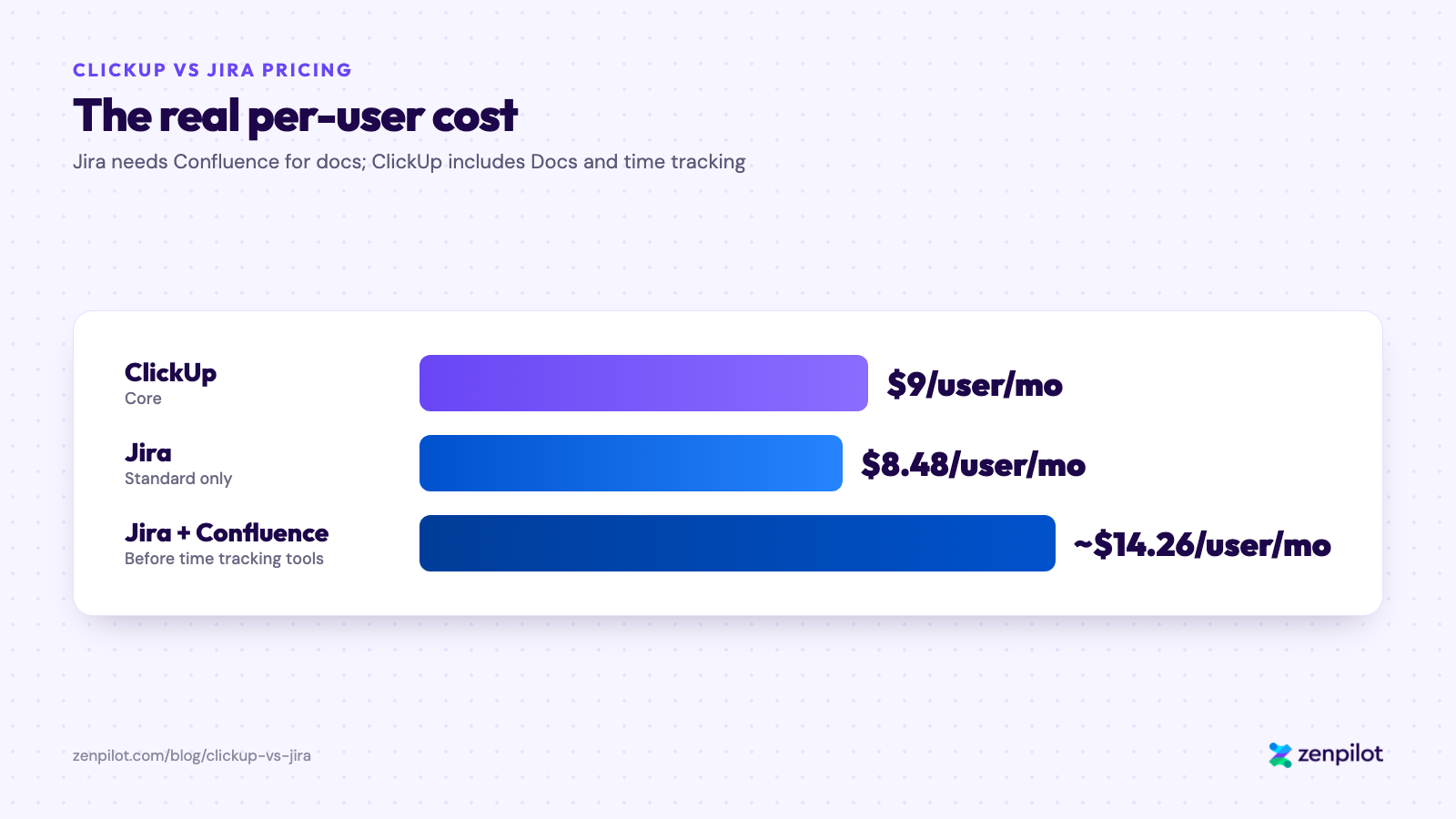
Jira looks cheaper until you add Confluence.
ClickUp includes Docs natively. It also includes time tracking natively. Jira requires third-party tools like Harvest or Toggl for time tracking, which adds another $5 to $10 per user per month for most agencies.
ClickUp scores 82% positive on value for money while Jira scores just 49%, according to Capterra user data. That gap lines up with the math: the sticker prices look similar, but the total cost of ownership does not.
For a 20-person agency on Jira Standard plus Confluence, you’re looking at roughly $285 per month before time tracking tools. The same team pays $180 per month on ClickUp Core or $340 per month on ClickUp Business, with docs and time tracking included. Add a $5 to $10 per user time tracking tool and the Jira team lands at roughly $385 to $485 per month.
Winner: ClickUp
Not Sure If ClickUp Is Right for Your Team?
Book a 30-minute clarity call. We’ll look at your current setup and give you an honest answer on whether ClickUp makes sense.
Book a Free Call →ClickUp vs Jira Hierarchy: How Each Tool Organizes Work
ClickUp’s hierarchy maps to how agencies operate. Jira’s structure maps to how sprint-based dev teams operate.
ClickUp organizes work in six levels:
- Workspace
- Space
- Folder
- List
- Task
- Subtask
For an agency, that maps cleanly to how work is organized:
- Space = Client or Department
- Folder = Service Line or Account
- List = Project or Campaign
- Task = Deliverable
Jira organizes work differently: Project, Board, Epic, Story, Task, and Subtask.
That structure is designed around software releases. Epics are large features. Stories are user requirements. Tasks are implementation steps. It’s logical for building software. It doesn’t map well to delivering an SEO retainer or managing a brand campaign.
We’ve watched hundreds of agencies try to force their service delivery model into Jira’s sprint-based structure. It always creates friction. The language doesn’t fit (what’s an “Epic” for a PR retainer?). The hierarchy doesn’t match (why does everything live inside a “Project”?). And the reports are built for velocity, not client profitability.
Winner: ClickUp for agencies. Jira for software development teams.
Day-to-Day Task Management in ClickUp vs Jira
ClickUp gives agencies more ways to see and manage work across clients. Jira gives developers the most powerful sprint-management experience available.
Both platforms offer List, Board, Gantt, and Calendar views.
ClickUp goes further with Space-level views. For an agency account manager, the most valuable view shows all active work for all clients in one place, and ClickUp lets you see every task across every client Folder without building a custom report.
Jira’s views are optimized for sprint velocity and backlog grooming. It doesn’t offer that kind of cross-project visibility natively.
ClickUp leads for agencies in a few other areas.
When a client pushes a project back two weeks, ClickUp lets you select the entire project and shift every due date at once. Jira doesn’t have native date remapping at that level.
ClickUp also lets you select multiple tasks and bulk-change assignees, dates, statuses, and Custom Fields in one action. Jira’s multi-task editing is limited to basic actions like moving or deleting.
And ClickUp templates can auto-assign due dates relative to a project start date when you deploy them, which saves agencies significant time during client onboarding. Jira templates don’t support this natively.
Where Jira wins: sprint boards, backlog grooming, velocity charts, and burndown reports. For a software team running two-week sprints, Jira’s task management is the best in the market.
Winner: ClickUp for agencies. Jira for sprint-based development.
ClickUp vs Jira Reporting: Which Is Better for Agencies?
ClickUp dashboards pull from your entire Workspace. Jira dashboards tell you how fast your dev team is shipping code.
ClickUp’s dashboards are built to give any team member visibility across the full organization. Jira’s dashboards are purpose-built for Agile metrics: burndown charts, velocity tracking, and release progress. For agencies that need time-by-client reporting and profitability dashboards, ClickUp is the clear choice.
An agency leadership team needs to see four things: how much time is being spent per client, whether projects are on track, who is over-allocated, and whether the agency is profitable. ClickUp’s dashboard system handles all four.
ClickUp lets you build dashboards that pull from any combination of Spaces, Folders, and Lists. You can create a leadership dashboard showing time tracked vs estimated across every client, an account manager view showing their portfolio status, and a team capacity view showing who has room for more work.
Jira’s dashboards are powerful but narrowly focused. They tell you sprint velocity, story points completed, and time-to-resolution. Those are the metrics a VP of Engineering needs. An agency director needs different ones.
One specific limitation: Jira caps your dashboards at 10 boards unless you’re on the Enterprise plan. For an agency managing 20 or 30 active clients, that constraint surfaces quickly.
Winner: ClickUp for agencies. Jira for engineering teams.
ClickUp vs Jira Integrations: 1,000+ vs 3,000+
Jira wins on integration count. ClickUp wins on the integrations agencies use.
Jira connects to 3,000+ tools compared to ClickUp’s 1,000+. Most of Jira’s integrations are developer-focused: CI/CD pipelines, code repositories, and incident management platforms.
If your team lives in GitHub, Bitbucket, and Jenkins, Jira’s integrations are unbeatable. That ecosystem is deep and battle-tested. It’s one of the strongest arguments for keeping Jira if you have a development function inside your agency.
For agencies, professional services firms, and marketing teams, the integrations that matter most are CRM (HubSpot, Salesforce), communication (Slack, Teams), file management (Google Drive, Dropbox), and time tracking (Harvest, Toggl, Clockify). ClickUp covers all of these natively or through tight integrations.
ClickUp’s Zapier and Make connectivity also allows automation across essentially any tool in your stack, partially closing the gap with Jira’s raw count.
ClickUp and Jira can also run side by side via two-way task sync. Some hybrid organizations use Jira for their dev team and ClickUp for account management and operations, syncing tasks between the two.
Winner: Jira for dev toolchains. ClickUp for service delivery tool stacks.
Should Your Agency Switch from Jira to ClickUp?
Switch if your team delivers client work. Stay if your team ships software.
Ask your team this: “Do we primarily manage code or client deliverables?” If the answer is client deliverables, campaigns, or service delivery, ClickUp will serve you better. If the answer is code, Jira is the right tool. Most agencies are on Jira by default, not by design.
We’ve worked with hundreds of agencies that moved to ClickUp through our implementation process. The teams that make the transition smoothly share a few things in common. Their work is organized around clients and service lines, not sprints and epics. They struggle with Jira’s lack of native docs and time tracking. Their team members outside of engineering find Jira confusing or avoid it entirely.
Teams that should stay on Jira fall into two categories: pure engineering teams where every person is writing code, and enterprise organizations with significant Atlassian infrastructure already in place where switching costs are genuinely high.
Signs Jira Isn’t Working for Your Agency
- Account managers don’t use it because it’s too complicated
- You’re paying for Confluence just to have a place for SOPs and meeting notes
- Time tracking lives in a separate tool because Jira doesn’t have native tracking
- Leadership can’t get a cross-client overview without exporting to a spreadsheet
- New hires take weeks to get up to speed on basic workflows
Signs ClickUp May Not Be the Right Move Yet
- Your engineering team runs formal Scrum with velocity tracking and release planning
- You have deep GitHub or Bitbucket integrations built into your daily workflow
- You’re part of a larger enterprise Atlassian deployment you don’t control
If the first list sounds familiar, our Blueprint process helps hundreds of teams rebuild their operations every year.
One thing we tell every client considering a switch: the tool is only part of the answer. The most common agency project management problems come from unclear processes, not the wrong platform. Switching tools without cleaning up your processes first just moves your mess from Jira to ClickUp.
ClickUp vs Atlassian AI: ClickUp Brain 2 vs Rovo
AI is the fastest-changing part of this comparison, and each platform’s AI reflects its core audience.
Atlassian Intelligence / Rovo includes natural language to JQL (describe what you want to find in plain English and Jira generates the query), AI Work Breakdown (give Rovo an epic description and it generates user stories and subtasks), issue summarization, Rovo Chat (cross-Jira/Confluence Q&A), Deep Research (compiled reports with citations), Virtual Agent for JSM (AI chatbot for IT service desk), and Rovo Agents (assignable to Jira issues as of February 2026).
Rovo Search, Chat, and Agents are now included starting on the Standard plan, with more on Premium ($15.56/user/month) and Enterprise.
ClickUp Brain 2 (launched June 2026, replacing the original Brain) has workspace-wide knowledge retrieval, automated standups, AI writing, Super Agents (AI coworkers with 500+ skills), multi-model access (GPT-5, Claude, o3), and MCP integration.
AI is included in every ClickUp plan as of October 2026, with a monthly pool of AI credits (1,000 per user on Core, 1,500 on Business). For the full breakdown, see our hands-on ClickUp Brain 2 review.
Where Jira and Rovo Have the Edge
Cross-product search across Jira, Confluence, and connected apps is more mature than ClickUp’s enterprise search, especially for organizations deep in the Atlassian stack.
The Rovo MCP Server lets AI coding tools like Claude Code, Cursor, and Gemini pull Jira and Confluence context natively. For engineering teams using AI-assisted development, this is significant.
Virtual Agent for JSM is a production-ready IT service desk chatbot. ClickUp has no equivalent for IT operations.
AI Work Breakdown maps cleanly to Jira’s agile structures (epics, stories, subtasks), so it’s a natural fit for sprint planning.
Where ClickUp Brain 2 Has the Edge
ClickUp Brain 2 works for any team, in any department. Jira’s entire AI value proposition sits on top of a tool most operations and creative teams won’t adopt.
ClickUp lets you pick between GPT-5, Claude, and o3. Rovo uses Atlassian’s model selection without user control.
ClickUp includes AI on every plan, with a monthly pool of AI credits. Atlassian now includes Rovo on Standard too, so this one’s closer than it used to be. The bigger difference is what the AI can see.
ClickUp’s AI connects to tasks, docs, time tracking, dashboards, and workload data in one platform. Rovo’s AI is powerful but scoped to Atlassian products. If your stack isn’t Jira + Confluence + JSM, it has less to work with.
For a complete breakdown of ClickUp AI features, pricing, Super Agents, and honest limitations, see our ClickUp AI guide.
ClickUp vs Jira Pros and Cons
ClickUp: Pros
- Tasks, docs, time tracking, goals, and dashboards in one platform
- Flexible hierarchy that maps directly to client work
- Cross-client visibility out of the box
- Lower total cost of ownership for service delivery teams
- Higher satisfaction ratings on G2 and Capterra
- Generous free plan with unlimited users and tasks
- Built-in time tracking with profitability reporting
ClickUp: Cons
- Significant setup investment required upfront
- Feature volume can overwhelm new users without guidance
- Less powerful for formal Agile/Scrum workflows
- Requires intentional design or it becomes as cluttered as what you left
Jira: Pros
- Best-in-class Agile and Scrum tooling
- The deepest developer tool integrations available
- Enterprise-grade scalability and security
- 50M+ users means extensive community support and documentation
- Atlassian ecosystem is very powerful when used fully
- Industry standard for software development teams
Jira: Cons
- Steep and ongoing learning curve
- Docs require Confluence as a separate paid add-on
- No native time tracking
- Dashboards capped at 10 boards on non-Enterprise plans
- Poor fit for non-technical team members
- Value for money rated at just 49% positive by Capterra users
- Language and structure don’t match service delivery work
Jira vs ClickUp: Which Is Better for Your Team?
For agencies, it’s ClickUp. For software teams, it’s Jira.
The one question: does your team primarily ship code, or deliver services?
If the answer is deliver services, ClickUp wins. Every category that matters to an agency points in one direction: hierarchy, views, time tracking, pricing, ease of use, and cross-client reporting. You’ll spend less money, give your whole team a tool they’ll use, and stop paying for Confluence just to have somewhere to put your SOPs.
If the answer is ship code, Jira wins. Its Agile tooling, developer integrations, and sprint management capabilities are unmatched. Don’t switch just because ClickUp has more reviews on G2.
| Team Type | Recommended Tool |
|---|---|
| Marketing or creative agency | ClickUp |
| Operations or admin team | ClickUp |
| Cross-functional service team | ClickUp |
| Software development team | Jira |
| Engineering-first startup | Jira |
| Hybrid agency with a dev function | Both (via sync integration) |
As ClickUp’s first and highest-rated Solutions Partner, we’ve seen this transition play out across 3,100+ clients. The teams that get the most out of ClickUp are the ones who design their workspace intentionally before they start building.
If you’re ready to move from Jira to ClickUp, or you just want to know whether it makes sense for your specific setup, book a clarity call with our team. We’ll give you a straight answer.
We’ll Build Your ClickUp Workspace for You
ZenPilot’s ClickUp Implementation designs and builds your ClickUp Workspace around your team’s actual workflows - no guesswork, no wasted setup time.
Learn About ClickUp Implementation →How to Migrate from Jira to ClickUp
If you’ve decided ClickUp is the right fit for your team, here’s a practical migration path based on what we’ve seen work across hundreds of Jira-to-ClickUp transitions.
- Map your Jira structure to ClickUp’s hierarchy. Jira Projects become ClickUp Spaces or Folders. Epics become Folders or Lists depending on your workflow. Stories and Tasks become ClickUp Tasks. Get this mapping right before you move anything.
- Export your Jira data. Use Jira’s built-in CSV export for each project. Export issues with all fields: assignees, statuses, priorities, custom fields, and comments. ClickUp’s import tool accepts Jira CSV exports directly.
- Design your ClickUp Workspace first. Build your Spaces, Folders, Lists, statuses, and Custom Fields before importing data. This is where most teams rush and regret it later. Your ClickUp structure should reflect how your team actually works, not mirror Jira’s project layout.
- Import projects in batches. Don’t try to migrate everything at once. Start with one or two active projects, verify the import quality, fix field mapping issues, then proceed with the rest.
- Rebuild workflows as ClickUp automations. Any Jira workflow rules, transition conditions, or post-functions need to be recreated in ClickUp’s automation builder. This is a good time to simplify. Most teams have accumulated Jira workflow complexity they don’t need.
- Replace Confluence with ClickUp Docs. Move active documentation into ClickUp Docs so everything lives in one platform. Archive older Confluence content rather than migrating it. Most of it won’t be referenced again.
Need help with the migration? ZenPilot has guided hundreds of teams through Jira-to-ClickUp transitions. Book a call with our team and we’ll build a migration plan specific to your setup.
More ClickUp Comparisons
- ClickUp vs Monday.com - the most popular comparison
- ClickUp vs Asana - features, pricing, and real results
- ClickUp vs Wrike - flexibility vs enterprise
- ClickUp vs Basecamp - simple vs powerful
- ClickUp vs Smartsheet - spreadsheet vs modern platform
- ClickUp vs Teamwork.com - built for service teams
- ClickUp vs Trello - when teams outgrow Kanban
- ClickUp vs Notion - work management vs knowledge management
- ClickUp vs Airtable - work management vs database-first
- ClickUp vs Todoist - team operating system vs personal task list
- ClickUp vs SmartSuite - agency work management vs no-code work platform
Frequently Asked Questions
What is the main difference between ClickUp and Jira?
ClickUp is an all-in-one work management platform built for any type of team. Jira is a specialized Agile tool built for software development teams. ClickUp handles tasks, docs, time tracking, and goals in one platform. Jira focuses on sprint planning, backlog management, and developer tool integrations.
ClickUp vs Jira: which is better?
It depends on whether your team ships code or delivers services. For agencies, professional services firms, and non-engineering teams, ClickUp is the stronger fit. For software development teams running Agile, Jira is.
Is ClickUp cheaper than Jira for agencies?
Yes, when you factor in total cost of ownership. ClickUp’s Core plan starts at $9 per user per month and includes docs and time tracking natively. Jira’s Standard plan starts at $8.48 per user per month but requires Confluence ($5.78 per user per month) for documentation and additional tools for time tracking. For most agencies, ClickUp’s total monthly cost is meaningfully lower.
Can ClickUp replace Jira for software development teams?
For hybrid teams where not everyone is a developer, yes. ClickUp supports Agile workflows including Scrum boards, backlogs, sprint tracking, and burndown charts. But Jira’s native integrations with GitHub, Bitbucket, and CI/CD pipelines are significantly deeper, so for pure engineering teams running formal Agile, Jira remains the stronger choice.
ClickUp vs Atlassian: can ClickUp replace both Jira and Confluence?
For service delivery teams, yes. ClickUp includes Docs natively, while Jira requires Confluence for documentation (Confluence Standard is $5.78 per user per month). Engineering teams with deep GitHub or Bitbucket integrations are usually better off staying on Jira.
How long does it take to migrate from Jira to ClickUp?
Typically two to four weeks for a small agency under 20 people with a well-defined structure. Larger teams with complex Jira configurations may need six to eight weeks. The most important factor is designing your ClickUp structure correctly before importing any data, which is why we recommend working with an experienced implementation partner.
Which tool has better customer reviews: ClickUp or Jira?
ClickUp. It outscores Jira on both G2 (4.7/5 vs 4.3/5) and Capterra (93% vs 87% satisfaction). ClickUp also scores significantly higher on value for money (82% positive vs 49%) and ease of use (75% positive vs 58%).
Want Help Making the Move to ClickUp?
Picking between ClickUp and Jira is the easy part. The hard part is setting up whichever tool you choose so your team uses it. A messy ClickUp Workspace won’t serve you any better than a confusing Jira instance did.
That’s the job at ZenPilot. We look at how your team runs ClickUp today, show you exactly what to fix, and help you roll out the fixes in a way your team will adopt instead of ignore.
If you want that kind of look at your workspace, book a free 30-minute call. Worst case, you walk away with a shorter list of things to worry about.