
ClickUp vs Basecamp: Simple vs Powerful - Which Does Your Team Need?

Pick Basecamp if your team is small (under 15 people), your work is straightforward, and async communication is your top priority. Pick ClickUp if you manage multiple clients or projects at once and need time tracking, automations, and real reporting. ClickUp wins for most teams.
Basecamp vs ClickUp is a choice between simple and powerful. Basecamp is stripped down and opinionated, built for small teams that want less. ClickUp gives you more views, more customization, and more structure.
ZenPilot is ClickUp’s #1 rated Solutions Partner, and we’ve helped 3,100+ clients implement ClickUp. Many of them came from Basecamp. The pattern is consistent: Basecamp worked great when they were small, then they hit a ceiling.
Here’s how to figure out which side of that line you’re on.
ClickUp vs Basecamp: Key Takeaways
ClickUp wins for any team that needs to scale
Deeper hierarchy, real reporting, time tracking, automations, and templates with date remapping. Basecamp has none of these.
Basecamp wins on simplicity and communication
Dead-simple UI, excellent async tools (message boards, campfires, check-ins), and flat-rate pricing that’s hard to beat for large teams.
Growing teams hit a ceiling in Basecamp
Most growing teams end up bolting on 3-5 extra tools around Basecamp (time tracking, reporting, automations, workload management), paying more and losing context.
Basecamp’s flat rate is cheaper for large teams
Basecamp Pro Unlimited at $299/mo flat is great for large teams, but ClickUp’s per-seat pricing includes far more functionality at every tier.
Basecamp vs ClickUp at a Glance
Here’s how ClickUp and Basecamp compare by category, rated from our experience with 3,100+ clients:
| Category | ClickUp | Basecamp | Notes |
|---|---|---|---|
| Hierarchy & Organization | ⭐⭐⭐⭐⭐ | ⭐⭐ | ClickUp’s deep hierarchy is built for multi-client, multi-department teams. Basecamp uses flat projects. |
| Task Management | ⭐⭐⭐⭐⭐ | ⭐⭐ | Basecamp lacks subtasks, custom fields, dependencies, and bulk editing. |
| Views & Reporting | ⭐⭐⭐⭐⭐ | ⭐ | Basecamp has no Gantt, timeline, workload, or dashboard views. |
| Communication | ⭐⭐⭐⭐ | ⭐⭐⭐⭐⭐ | Basecamp’s message boards and Campfires are excellent for async communication. |
| Templates | ⭐⭐⭐⭐⭐ | ⭐⭐ | ClickUp has multi-level templates with date remapping. Basecamp has basic project templates. |
| Automations | ⭐⭐⭐⭐⭐ | ⭐ | Basecamp has no automation capabilities. |
| Integrations | ⭐⭐⭐⭐⭐ | ⭐⭐ | ClickUp has 1,000+ native integrations. Basecamp relies mostly on Zapier. |
| Time Tracking | ⭐⭐⭐⭐⭐ | ⭐ | ClickUp has native time tracking. Basecamp has none. |
| Ease of Use | ⭐⭐⭐ | ⭐⭐⭐⭐⭐ | Basecamp wins on simplicity. It’s dead simple to learn. |
| Pricing | ⭐⭐⭐⭐ | ⭐⭐⭐⭐⭐ | Basecamp’s flat-rate pricing is a standout. No per-seat fees. |
| Overall | ⭐⭐⭐⭐⭐ | ⭐⭐⭐ | Basecamp is great for simplicity. ClickUp is better for teams that need to scale. |
- You manage multiple clients or projects at once and need real reporting and visibility.
- You’re scaling your team and need time tracking, automations and templates with date remapping.
- You run a service-based business: agency, professional services, consulting or marketing.
- You’ll invest in setup and training. ClickUp has a steeper learning curve.
- Your team is small (under 15 people) and you don’t expect to grow significantly.
- Your work is straightforward, with no need for dependencies, custom fields or complex workflows.
- Async communication is your top priority.
- You want flat-rate pricing and zero learning curve.
What Is ClickUp?
ClickUp is an all-in-one work management platform. It combines project management, docs, time tracking, dashboards, goals, and team chat in a single Workspace.
It’s built around a flexible hierarchy (Workspace > Spaces > Folders > Lists > Tasks). You can organize work by client, by department, or by project type, and still zoom out to see everything happening across the business in one view.
ClickUp is the platform we implement at ZenPilot. It’s the tool we recommend for teams that need a real operating system and have outgrown a task list.
What Is Basecamp?
Basecamp is a project management and team communication tool built around simplicity. It was created by 37signals and has been around since 2004, making it one of the original web-based PM tools.
Basecamp organizes work into flat “projects.” Each one gets the same built-in tools: a message board, to-do lists, a schedule, a file storage area, a group chat (Campfire), and automatic check-ins.
That’s it, and that’s intentional. Basecamp’s whole philosophy is that project management tools have gotten too complicated and teams need less.
It’s an appealing pitch. For certain teams, it’s the right call.
Download the Complete “How to Use ClickUp” Guide
The 56-page guide from ClickUp’s #1 Solutions Partner covers everything from hierarchy design to team training.
Get Instant Access →Hierarchy: ClickUp’s Five Levels vs Basecamp’s Flat Projects
This is the single biggest difference between ClickUp and Basecamp, and it’s the reason most growing teams eventually leave Basecamp.
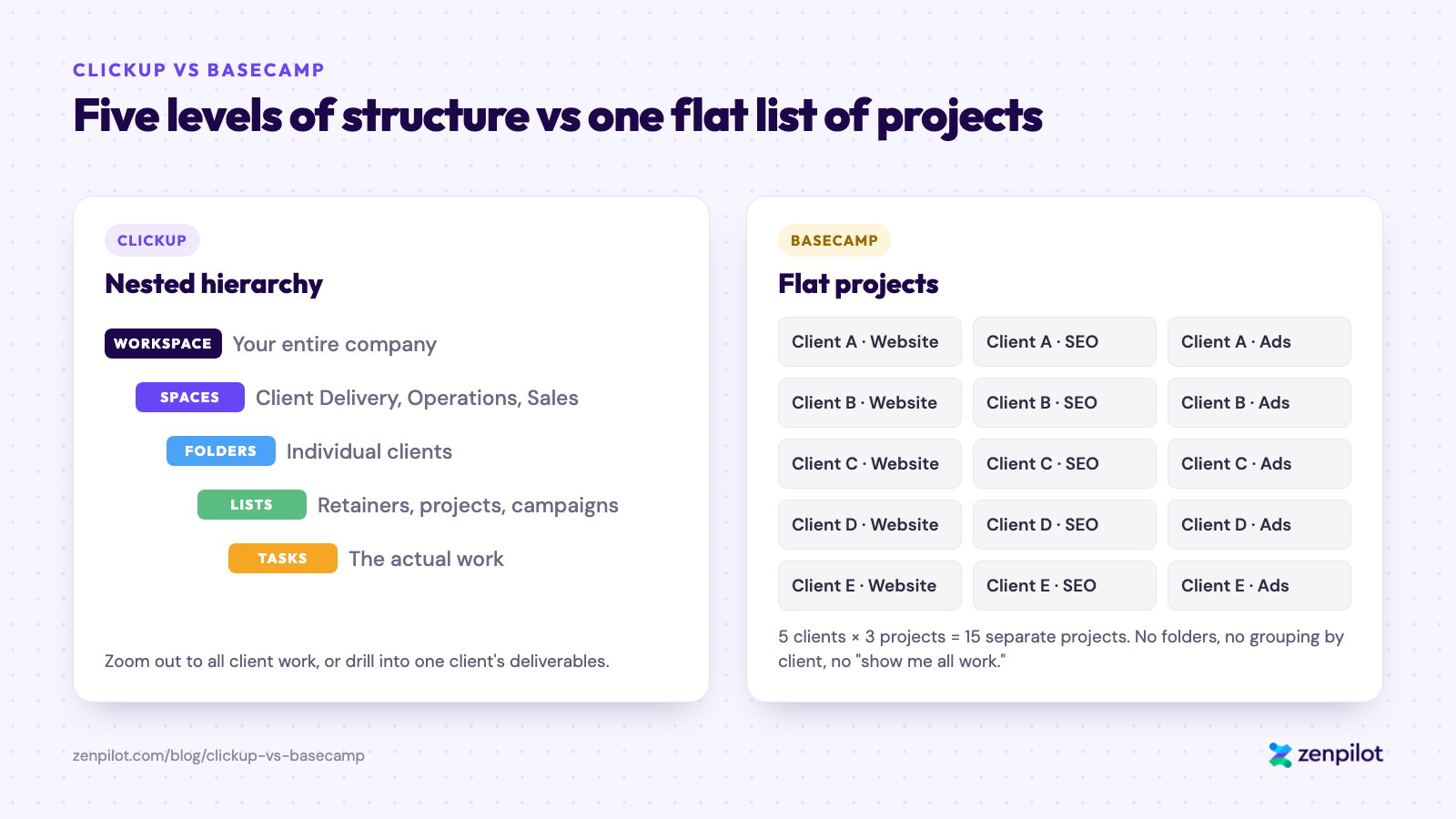
ClickUp nests work by client and service. Basecamp keeps every project in one flat list.
ClickUp: Built for Structure
ClickUp’s hierarchy gives you five levels to organize work:
- Workspace: your entire company
- Spaces: major divisions (e.g., Client Delivery, Internal Operations, Sales)
- Folders: sub-categories (e.g., individual clients, departments)
- Lists: groups of tasks (e.g., retainer work, projects, campaigns)
- Tasks and Subtasks: the actual work
A director of client services can zoom out to see all client work across every account, drill into one client’s deliverables, then open an individual task. Views at every level of the hierarchy give different team members the visibility they need.
For more detail, see our guide on the best ClickUp hierarchy for agencies.
Basecamp: Intentionally Flat
Basecamp doesn’t have a hierarchy. It has projects. There’s no nesting, no folders within projects, and no way to group projects under a client or department.
If you manage five clients with three active projects each, you’ll have 15 separate Basecamp projects sitting in a flat list. There’s no way to say “Show me all work across all clients” or “What’s the workload across my team right now?”
For a five-person team with straightforward work, this is fine. You don’t need a multi-level hierarchy when everyone can see everything.
Once you scale past a handful of projects, the flat structure starts to hurt. Finding things takes longer, visibility across the business disappears, and reporting becomes manual.
Winner: ClickUp. Views, reporting, and templates all depend on the hierarchy.
Task Management: ClickUp Tasks vs Basecamp To-Dos
ClickUp: Full-Featured Task Management
ClickUp tasks support:
- Custom fields for anything you want to track: client name, budget, priority, project type, approval status
- Subtasks and checklists, with assignees and due dates at every level
- Dependencies, so one task can’t start until another finishes
- Multiple assignees on one task
- Time estimates and time tracking
- Custom statuses, so you can define your own workflow stages per List
- Priority levels
- Bulk editing to update dozens of tasks at once
- Date remapping to shift all dates when timelines change
For agencies juggling multiple clients and deliverables with overlapping timelines, these are essential.
Basecamp: Basic To-Dos
Basecamp’s task management is minimal by design. You get to-do lists with items that can be assigned to one person with a due date. That’s essentially it.
No subtasks. No custom fields. No dependencies. No priority levels. No bulk editing. No custom statuses. Items are either done or not done.
If your team needs to track anything beyond “who’s doing this and when is it due,” you’re going to need a separate tool or a spreadsheet alongside Basecamp. And once you’re running a spreadsheet alongside your project management tool, the tool has failed its job.
Winner: ClickUp. This isn’t close. Basecamp’s to-do lists are fine for a grocery list.
Views and Reporting: 15+ ClickUp Views vs None in Basecamp
ClickUp: 15+ View Types and Dashboards
ClickUp has 15+ view types, including:
- List view (traditional task list)
- Board view (Kanban-style columns)
- Gantt chart (timeline with dependencies)
- Calendar view
- Timeline view (time-based planning)
- Workload view (team capacity at a glance)
- Table view (spreadsheet-style editing)
- Dashboard view (custom widgets for reporting)
- Box view (work grouped by assignee)
- Map view, Form view, Activity view, and more
You can create views at any level of the hierarchy. Leadership can have a dashboard showing all active client projects while individual contributors see their personal task list for the day.
ClickUp’s dashboards let you build custom reporting with widgets for task completion rates, time tracked vs. estimated, workload distribution, overdue tasks, and more.
Basecamp: What You See Is What You Get
Basecamp doesn’t have views. Each project has its fixed set of tools: message board, to-do lists, schedule, files, chat, and check-ins. There’s no Gantt chart, no timeline, no workload view, no dashboards.
The one visual tool is Hill Charts. You manually drag a dot on a hill-shaped curve to show how far along a piece of work is. It’s a rough indicator, and it isn’t driven by data.
Want to see which team members are overloaded? Can’t do it in Basecamp. Want a timeline showing how your project phases overlap? Not possible. Need a dashboard for leadership showing health across all active clients? You’ll need something else.
Winner: ClickUp. Basecamp doesn’t attempt to compete here.
Project Management Benchmark
See how your operations stack up against 3,100+ other teams. Takes 3 minutes.
Take the Assessment →Communication: Where Basecamp Beats ClickUp
This is Basecamp’s strongest category, and the one area where it outshines ClickUp.
Basecamp: Built for Async Communication
Basecamp was built by a remote team that values asynchronous communication, and it shows. Every project includes:
- Message Boards: long-form, threaded discussions that replace email chains. You post an update, people respond when they’re ready, and conversations stay organized by topic.
- Campfires: casual group chat rooms within each project. Think Slack-lite, scoped to a specific project.
- Automatic Check-ins: recurring questions Basecamp asks your team on a schedule (e.g., “What did you work on today?” or “What’s blocking you?”). Responses are visible to the whole team.
- Pings: direct messages between individuals.
These tools are thoughtful and well-designed. They encourage teams to write things down rather than hop on calls. For fully remote teams that want fewer meetings and less Slack noise, Basecamp’s communication model is legitimately great.
ClickUp: Communication Built into Work
ClickUp’s communication is attached to the work itself:
- Task comments (threaded discussions directly on tasks)
- ClickUp Chat (team messaging inside the Workspace)
- @mentions anywhere
- Email integration (send and receive emails from within tasks)
- Whiteboards for visual collaboration
- Docs for longer-form content
The upside is that context is always attached. You’re discussing work right where the work lives. The downside is that it doesn’t have the same polished, standalone communication experience that Basecamp has.
Winner: Basecamp. If async communication is your top priority, Basecamp does it better than almost any PM tool on the market. ClickUp’s communication is functional and improving.
Templates: Date Remapping vs Basic Project Templates
Templates matter for teams doing repeatable work, which includes basically every agency and professional services firm.
ClickUp lets you create templates at every level of the hierarchy:
- Task templates: standard tasks with subtasks, checklists, custom fields, and assignees
- List templates: entire workflows you can deploy for new projects or client retainers
- Folder templates: complete client setups with multiple Lists
- Space templates: full department structures
The part that saves the most time is date remapping. When you deploy a template in ClickUp, it asks for a start date and shifts all the due dates relative to that anchor. For agencies launching new client engagements or repeatable campaign cycles, this saves hours of manual scheduling.
Basecamp lets you save a project as a template and create new projects from it. The template preserves your to-do lists and message board topics, but there’s no date remapping, no custom field mapping, and no multi-level template hierarchy.
For simple, repeatable project setups, Basecamp’s templates get the job done. If your processes have different phases, dependent deadlines, or custom tracking fields, you’ll hit the wall fast.
Winner: ClickUp.
Automations: 100+ ClickUp Recipes vs None in Basecamp
ClickUp has 100+ automation recipes out of the box, plus custom automations built from triggers, conditions, and actions. Examples:
- When a task status changes to “Approved,” automatically assign it to the next person and change the due date
- When a task is created in a specific List, automatically apply a template
- When a due date arrives, send a notification to the assignee’s manager
You can also connect ClickUp automations to external tools, sending data to or triggering actions in other apps. And that’s before you factor in ClickUp’s AI. Our ClickUp AI breakdown covers what Brain adds on top.
Basecamp has no automation capabilities. Every status change, assignment, and notification is manual.
For small teams, this might not matter. For any team doing volume work across multiple clients, it means more manual busywork and more room for things to fall through the cracks.
Winner: ClickUp.
Integrations: 1,000+ Native vs Mostly Zapier
ClickUp integrates natively with 1,000+ tools, including Slack, HubSpot, Google Drive, Zoom, Figma, and GitHub. It also has an API and connects to Zapier and Make for anything without a native integration.
Basecamp has a handful of native integrations, mainly for file storage services like Google Drive and Dropbox. For everything else, you’ll need Zapier or a third-party connector.
Basecamp’s API exists, but the integration ecosystem is nowhere near as deep as ClickUp’s. If your tech stack includes tools like HubSpot, Slack, or any kind of reporting platform, connecting them to Basecamp will require workarounds.
Winner: ClickUp.
ClickUp vs Basecamp Pricing
Pricing is the one area where Basecamp has a compelling advantage.
Basecamp Pricing: $15/User or $299/Month Flat
- Basecamp: $15/user/month
- Basecamp Pro Unlimited: $299/month flat, unlimited users
Whether you have 10 users or 200, Pro Unlimited costs the same $299/month. For larger teams, this is much cheaper than any per-seat PM tool.
For a 50-person team, Basecamp Pro Unlimited works out to about $6/user/month. For a 100-person team, it’s $3/user/month. That’s hard to beat.
ClickUp Pricing: Free Plan, Then $9/Member/Month
- Free Forever: unlimited members, 60 MB storage, core features
- Core (formerly Unlimited): $9/member/month (billed annually)
- Business: $17/member/month (billed annually)
- Enterprise: custom pricing
ClickUp’s free plan is usable, with unlimited members and access to most features. The paid plans are competitively priced for what you get, but costs scale linearly with team size.
For a 50-person team on ClickUp Business, you’re looking at $850/month, nearly triple Basecamp Pro Unlimited. You’re also getting far more functionality.
Winner: Basecamp on raw cost. ClickUp on value. Basecamp’s flat pricing is excellent for budget-conscious teams. Most teams that try to save money with Basecamp end up paying for additional tools (time tracking, reporting, automations) that are already built into ClickUp.
Start with the ZenPilot Blueprint
We’ll design your ClickUp Workspace around your team’s actual workflows - no guesswork, no wasted setup time.
Learn About the Blueprint →Who Should Choose Basecamp?
Basecamp is a solid choice if:
- Your team is small (under 15 people) and you don’t expect to grow significantly
- Your work is straightforward and you don’t need dependencies, custom fields, or complex workflows
- Async communication is your top priority and you want to reduce meetings and email
- You hate per-seat pricing. Basecamp Pro Unlimited’s flat rate is great for larger teams with simple needs
- You want zero learning curve. Basecamp can be set up and understood in under an hour
- You’re philosophically aligned with simplicity. You don’t want more features and believe constraints breed creativity
Basecamp does exactly what it sets out to do. The problem is that what it sets out to do is limited.
Who Should Choose ClickUp?
ClickUp is the better choice if:
- You manage multiple clients or projects simultaneously. The hierarchy and views are built for this
- You need real reporting and visibility: dashboards, workload views, and org-wide reporting
- You’re scaling your team and don’t want to hit a feature ceiling
- You need time tracking built in, with no extra tool required
- You want automations to reduce manual work and keep processes consistent
- You need templates for repeatable work, with date remapping
- You run a service-based business (agencies, professional services, consulting, marketing teams). This is our bread and butter at ZenPilot, and ClickUp is the platform we recommend after working with 3,100+ clients
The trade-off is that ClickUp has a steeper learning curve. It takes setup and training to get the value out of it. That’s exactly why we exist: to help teams implement ClickUp the right way so they get the ROI from it.
The Basecamp Ceiling: When Teams Outgrow It
Here’s the pattern we see over and over at ZenPilot.
A team starts on Basecamp when they’re small. Five people, a handful of clients, simple work. Basecamp is perfect. It’s clean, it’s easy, everyone loves it.
Then they grow. They add clients and team members. They start needing to track budgets, manage workloads, build reports for leadership, and standardize their delivery process across the team.
Basecamp can’t do any of that.
So they start adding tools. A separate time tracker. A spreadsheet for reporting. A Slack workspace for the communication Basecamp’s Campfires can’t handle at scale. A separate tool for client-facing project visibility.
Before long, they’re running four or five tools to do what one platform could handle. They’re paying more, managing more, and losing context as information gets scattered across systems.
That’s the ceiling. Basecamp is intentionally simple, and that simplicity becomes a limitation when your needs grow.
ClickUp doesn’t have that ceiling. It might take more effort to set up properly, but once it’s configured for your team, it scales with you. Most teams that come to us from Basecamp wish they’d made the switch sooner.
If you want help deciding whether it’s time to make the move, or you’ve already decided and want to implement ClickUp the right way, book a call with our team.
For a broader look at how to evaluate project management tools, see our guide on how to choose the best PM tool for your team.
Basecamp vs ClickUp: Final Verdict
ClickUp wins for most teams. The hierarchy, views, automations, and templates give you the building blocks for a real operating system.
Basecamp wins on simplicity and pricing. If you’re a small team that doesn’t need more than basic to-dos and great async communication, Basecamp is a well-built tool that does those things excellently. Don’t overcomplicate things if you don’t need to.
But if there’s any chance your team will grow, your workflows will get more complex, or your leadership will need real reporting and visibility, start with ClickUp. You’ll save yourself the pain of migrating later.
If you want help implementing ClickUp for your team, that’s what we do. We’ve helped 3,100+ clients build their operations in ClickUp. Book a free call and let’s talk about what the right setup looks like for your team.
We’ll Build Your ClickUp Workspace for You
ZenPilot’s Blueprint process designs and builds your ClickUp Workspace around your team’s actual workflows - no guesswork, no wasted setup time.
Learn About the Blueprint →How to Migrate from Basecamp to ClickUp
If you’ve decided it’s time to make the switch, here’s what the migration looks like:
- Audit your current Basecamp projects. List every active project, which teams use it, and what’s important to keep. Most teams find that 30-50% of their Basecamp projects are inactive or unnecessary.
- Design your ClickUp hierarchy. This is the most important step. Map your Basecamp projects to ClickUp’s Spaces, Folders, and Lists. Take the opportunity to organize work by client, department, or function, the structure Basecamp never gave you.
- Rebuild your processes as templates. Every repeatable workflow in Basecamp becomes a ClickUp template with date remapping, custom fields, and automations. This is where you’ll see the biggest productivity gain.
- Migrate selectively. Basecamp doesn’t have a native export-to-ClickUp tool, so you’ll use a combination of manual setup and CSV imports. Don’t try to migrate everything. Bring over active projects and let archived work stay in Basecamp (you can keep it read-only).
- Set up automations. Replace the manual work Basecamp required (status updates, assignments, notifications) with ClickUp automations.
- Train your team. The people who loved Basecamp’s simplicity will need extra attention. Show them how ClickUp can be equally simple for their daily workflow while giving leadership the visibility they’ve been missing.
We’ve guided hundreds of Basecamp-to-ClickUp migrations at ZenPilot. If you want expert help, book a call.
More ClickUp Comparisons
- ClickUp vs Monday.com - the most popular comparison
- ClickUp vs Asana - features, pricing, and real results
- ClickUp vs Wrike - flexibility vs enterprise
- ClickUp vs Smartsheet - spreadsheet vs modern platform
- ClickUp vs Teamwork.com - built for service teams
- ClickUp vs Trello - when teams outgrow Kanban
- ClickUp vs Notion - work management vs knowledge management
- ClickUp vs Jira - project management vs issue tracking
- ClickUp vs Airtable - work management vs database-first
- ClickUp vs Todoist - team operating system vs personal task list
- ClickUp vs SmartSuite - agency work management vs no-code work platform
Frequently Asked Questions
Is ClickUp better than Basecamp?
For most teams, yes. ClickUp has a deeper hierarchy, more powerful task management, built-in time tracking, automations, and reporting that Basecamp doesn’t have. Basecamp is a better fit only for small teams with simple needs that prioritize ease of use and async communication over functionality.
Basecamp vs ClickUp: which is easier to use?
Basecamp. It can be set up and understood in under an hour. ClickUp has a steeper learning curve and takes setup and training.
Why do teams switch from Basecamp to ClickUp?
Most teams outgrow Basecamp as they scale. The lack of subtasks, custom fields, dependencies, automations, time tracking, and real reporting forces growing teams to add multiple tools alongside Basecamp. Switching to ClickUp puts everything in one platform.
Is Basecamp good for agencies?
Only for very small agencies with straightforward workflows. Most agencies outgrow it quickly. Agencies typically need multi-client hierarchy, workload management, time tracking, templates with date remapping, and reporting dashboards, and Basecamp has none of them. ClickUp is a much stronger fit for agency operations.
Does Basecamp have time tracking?
No. Basecamp does not include native time tracking. You would need a third-party integration like Harvest or Toggl to track time. ClickUp includes built-in time tracking, with reporting that ties tracked time back to tasks, projects, and clients.
How much does Basecamp cost compared to ClickUp?
Basecamp has a flat-rate Pro Unlimited plan at $299/month for unlimited users, which is excellent for larger teams on a budget. ClickUp uses per-seat pricing starting at $9/member/month for the Core plan. For small teams, costs are similar. For large teams, Basecamp is cheaper on paper, but most teams end up paying for additional tools to fill gaps that ClickUp covers natively.
Can you migrate from Basecamp to ClickUp?
Yes, but Basecamp doesn’t have a native export-to-ClickUp tool. You’ll use a combination of manual setup and CSV imports, so bring over active projects and let archived work stay in Basecamp.
Making the Switch? Don’t Do It Alone
Moving off Basecamp is the easy part. Building a ClickUp Workspace your team adopts (the hierarchy, templates, automations, and reporting Basecamp never gave you) is where most migrations stall.
That’s the job at ZenPilot. We look at how your team works today, design the Workspace around your real processes, and help you roll it out in a way your team will adopt instead of ignore.
If you want that kind of help with your migration, book a free 30-minute call. Worst case, you leave with a clearer picture of what your rollout should look like.