
The Proven Process Documentation Framework from a ZenPilot Process Pro
 Ian Shockey ·
 Process documentation is crucial, but many struggle to create frameworks that actually work. That’s why in this blog post, I’ll be sharing some of the proven process documentation principles used right here at ZenPilot.
Our frameworks aren’t based on untested theory - they’re forged in the trenches of streamlining real-world agency operations every day, with 3,100+ agencies served and counting.
In this guide, you’ll get insights from ZenPilot’s own Hannah Shark, one of our Client Coaches who uses her process expertise every day to help companies run faster and better.
With her deep experience optimizing agency workflows, Hannah will share what truly matters (and what doesn’t!) when creating process documentation.
Consider this your peek inside the ZenPilot playbook. You’ll learn our focused, field-tested approach to building process documentation frameworks that transform teamwork.
We’ll cover:
- Why process documentation is so important
- Common pitfalls to avoid
- The ZenPilot step-by-step framework
- Key elements to include (and exclude!)
- Keeping documentation updated
- What’s needed beyond documentation
Let’s get started documenting!
For a full deep dive into Hannah’s process building advice, watch our full live stream recording here:
Why Process Documentation is Crucial
Process documentation simply means writing down and organizing the steps needed to complete key workflows in your business. This serves many purposes:
- Onboarding new team members faster - Without documentation, new hires must learn through word of mouth. With thorough documentation, training happens much quicker.
- Preventing dependence on tribal knowledge - Undocumented processes create bottlenecks. Key details remain siloed in team members’ heads. Documentation makes institutional knowledge accessible to all.
- Enabling continuity despite team changes - Documentation means no worrying about team members winning the lottery and retiring early (as Hannah colorfully put it in her live stream!). Turnover doesn’t undermine operations.
- Optimizing and standardizing processes - Documentation highlights improvement opportunities. Teams can align on ideal workflows, rather than everyone having their own way of doing things.
- Reducing redundant questions - With a trusted central knowledge base, team members don’t have to constantly interrupt each other for information.
Given these significant benefits, every team should at least strongly consider prioritizing comprehensive process documentation.
Benchmark Your Agency Ops
Take the Agency Project Management Benchmark Assessment to see how your operations stack up against 3,100+ other agencies.
The Pitfalls of Poor Process Documentation
Lack of documentation leads to major headaches including:
- New team members take months to fully ramp up without proper onboarding documentation. Their early tenure is marked by constant questions and low productivity.
- No standards exist across the team for completing workflows. Work quality varies wildly depending on who completes it.
- Every process change requires re-educating the entire team through burdensome meetings. Confusion abounds.
- Team members constantly ping each other for basic information. Excess meetings and messages disrupt focus.
- No playbooks exist for completing complex deliverables. Steps are missed or completed out of order.
- Bottlenecks form around tribal knowledge. Team members who know key processes go on vacation, causing progress to halt.
These pitfalls create enormous drag on team productivity and morale. They quickly compound wasted time and mistakes.
That’s why building out a comprehensive process documentation framework is so crucial.
The Only Fully Guaranteed Agency Operations Improvement Framework
Get** 360 clarity** into your operations or your money back, guaranteed.
Design My Blueprint
Introducing Process Documentation Frameworks
A process documentation framework means having:
- Documentation covering all key team workflows and processes
- Documents stored in a central knowledge base
- Standard templates for workflow documentation
- A standard methodology for creating and maintaining documents
Frameworks enable consistency. They allow teams to document processes efficiently while ensuring useful formatting and organization.
Essentially, a framework is a master plan for effective process documentation. It transforms process documentation from an ad-hoc effort into a scalable system.
Related: The Ultimate Guide to SOPs: Turn Your Business Into a Process-Driven Machine
BONUS
Download the Complete ClickUp for Agencies Guide FREE
The 47-page guide includes graphics, checklists, and links to how-to videos so you can actionize your ClickUp plan.
Building a Process Documentation Framework Step-By-Step
Now let’s explore how to build a process documentation framework for your team step-by-step.
Step 1) Conduct workflow interviews
Gather team members together in groups or 1-on-1 to map existing processes.
Ask guided questions like “Walk me through what happens when you publish a blog post from start to finish”.
Take diligent notes to begin compiling steps for documentation.
Step 2) Review existing documentation
Many team members likely have process documentation already created for their roles and workflows.
Gather these documents to serve as a starting point for your framework.
Step 3) Record workflows with screen capture tools
Use tools like Tango and Scribe to instantly capture team members’ screens as they walk through workflows.
This requires almost no manual documentation work.
Step 4) Organize and centralize documents
Select a centralized platform like Guru or Confluence to house documentation.
This gives everyone a single source of truth for quick access to the latest processes.
Step 5) Create documentation templates
Design standardized templates for process documents moving forward.
We recommend ClickUp or Teamwork.com for this. (Click either tool to go to our in-depth guide on how to structure your whole agency in it.)
This ensures consistency across future documentation.
Recommended sections:
- Overview
- Required Materials/Systems
- Step-by-Step Instructions
- Images/Screenshots
- Key Contacts
- Related Documents
Step 6) Map documentation to workflows
Organize documentation based on team workflows vs. by person or job function. This facilitates finding the right docs during execution.
For example, “Website Redesign” instead of “John’s responsibilities”
Step 7) Set reminders for document review
In tools like Guru, set quarterly or biannual reminders to review and refresh each document.
This ensures docs stay up-to-date as processes evolve.
Step 8) Prioritize documentation for top workflows
Identify the 5-10 most frequent and important workflows and focus initial documentation efforts here.
Common examples: client onboarding (steal our client onboarding process and template here), project launches, reporting.
Related: Stop Leaking Money: Gain Clear Visibility Into Utilization and Profitability Using ClickUp Data
Step 9) Add screenshots and visuals
Insert screenshots to illustrate complex steps like navigating software menus and dashboards.
Visuals simplify comprehension and recall.
Step 10) Include process-related checklists
Checklists within documentation provide helpful task reminders as users complete workflows.
For example, a client onboarding checklist may include:
- Send welcome packet
- Schedule kickoff call
- Create project folder
- Send NDA
- Send questionnaire
Related: Agency Client Onboarding: The Exact Process To Follow
Step 11) Insert links to related documents
Link out to related process docs, SOPs, templates and training materials for quick access when completing workflows.
Related: How to 10x Productivity With ClickUp Templates
Step 12) Highlight key contacts
Note key team members involved in each process with their responsibilities and contact info.
This facilitates quickly identifying whom to contact with questions.
Step 13) Outline dependencies
Note predecessor steps each task depends on for clarity of sequencing and dependencies.
For example:
- Task A
- Task B (dependent on task A)
- Task C (dependent on task B)
This prevents broken workflows when steps are completed out of order.
Step 14) Continuously iterate
Treat process documentation as living documents.
Note any ways to improve as you execute workflows. Update docs in real-time.
Now you have a comprehensive process documentation framework!
Client Onboarding ClickUp Template
Access our pre-built Client Onboarding ClickUp template, 100% free.
Get My Template
Elements to Include in Process Documentation
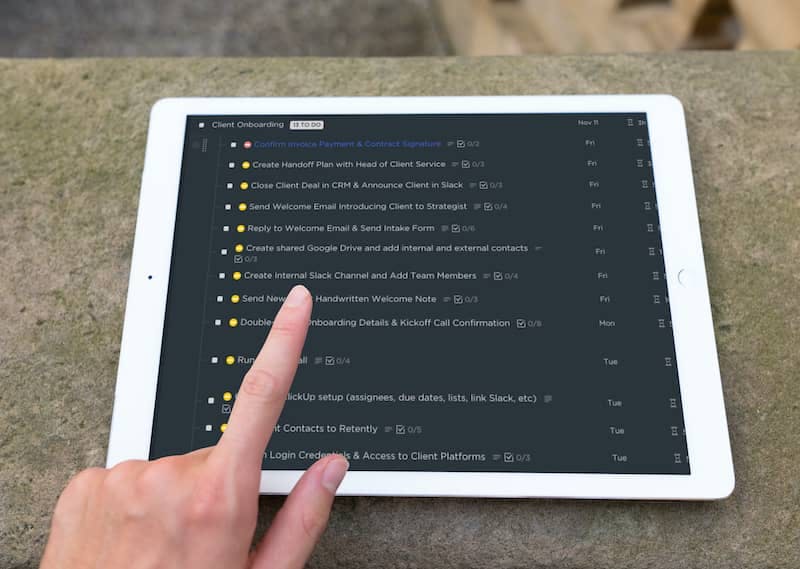
Beyond overall frameworks, optimal process documentation also includes:
- Due Dates - When tasks must be completed
- Time Estimates - How long tasks take (for capacity planning)
- Task Types - Actionable, meetings, non-actionable, etc.
- Dependencies - Sequencing rules
- SOPs - Step-by-step standard operating procedures
- Checklists - Reminders and requirements for users as they complete tasks
- Visuals - Screenshots, photos, illustrations
- Templates - Attach related templates and examples
Related: How to 10x Productivity With ClickUp Templates
With each process fully documented including these elements, teams have all the information needed to successfully execute workflows.
Maintaining and Updating Documentation
Documentation frameworks provide the foundation, but maintenance brings documentation to life.
Be diligent about reviewing and updating documentation regularly. Treat it as a living body of knowledge.
Without constant care, documentation quickly becomes obsolete. Don’t document once and forget!
Allocate time for reviewers to refresh documentation quarterly, biannually or as processes change.
In tools like Guru, set reminders to prompt these reviews on schedule.
Empower all team members to suggest documentation improvements in real-time. Maintain documentation vigilantly!