ClickUp Consultants: What They Do, What They Cost, and How to Choose

If you’re researching ClickUp consultants, you’re probably in one of two spots.
You’ve already decided to hire one and you’re comparing options. If that’s you, skip the reading and start at our ClickUp consultant page - that’s where the hire-intent path lives, including how we work and what it costs.
Or you’re earlier than that. You know ClickUp is underperforming for your team, and you’re trying to figure out whether a consultant is even the right fix, what one actually does, and what a fair price looks like. This post is for you.
One disclosure before we start, because you deserve it: ZenPilot is a ClickUp consultancy. We became ClickUp’s first partner in 2018 and we’re still ClickUp’s first and highest-rated Solutions Partner, with 3,100+ clients since ZenPilot was founded in 2013. So yes, we have a horse in this race. Factor that into everything below. We’ve tried to write the guide we’d want to read if we were on your side of the table, including the parts about when you should NOT hire anyone.
What Does a ClickUp Consultant Do?
A ClickUp consultant designs, builds, and optimizes your ClickUp workspace so your team actually adopts it - covering hierarchy design, workflows, custom fields, dashboards, automations, integrations, and training.
That’s the one-sentence version. Here’s what the work looks like in practice:
- Hierarchy design - mapping your Spaces, Folders, and Lists to how your business actually runs. This is the foundation everything else sits on, and it’s the thing most DIY setups get wrong first. (Here’s how we structure ClickUp for agencies.)
- Custom fields and views - building views your team actually wants to open, backed by the fields that make reporting possible.
- Dashboards - leadership-grade reporting on capacity, client health, and project status.
- Automations and integrations - native ClickUp automations plus tools like Make or Zapier to connect ClickUp to the rest of your stack.
- Process buildout - turning the workflows in your team’s heads into templated, repeatable processes inside ClickUp.
- Training and adoption - the part that separates a consultant from a template. A build nobody uses is an expensive decoration.
Good consultants spend as much time on the last item as the first five. Tools don’t fix teams. Tools, process, and habits together do.
Do You Need a Consultant, or Should You DIY?
Not everyone should hire a consultant, and we’d rather tell you that now than on a sales call.
DIY makes sense if:
- You’re a team of 1-5 with relatively simple workflows
- Someone on your team genuinely enjoys systems work and has the hours to do it
- You’re still validating whether ClickUp is even your long-term platform
If that’s you, start with our free ClickUp for Agencies guide. It’s the same implementation process we use with clients, written out step by step. Plenty of teams have built solid workspaces from it without paying us a dollar.
A consultant starts making sense when:
- You’ve been “getting around to fixing ClickUp” for more than a quarter
- Your team has quietly stopped trusting the data in it, so people are back to spreadsheets and Slack threads
- You’re 10+ people and every hour of workspace confusion is multiplied across the team
- You’ve already tried a rebuild and adoption fizzled within a month
The honest math: most teams that set up ClickUp themselves use a fraction of its capabilities and spend months in trial and error before either living with a messy workspace or paying someone to untangle it. A consultant is expensive relative to a template and cheap relative to six months of a frustrated team.
Not sure which camp you’re in? Take the Project Management Health Benchmark. It takes a few minutes and shows you where your operations stand against other teams.
The Complete ClickUp for Agencies Guide
The 47-page implementation guide we’ve used with 3,100+ clients. If you’re leaning DIY, start here before you spend anything.
Get the Guide →How Much Does a ClickUp Consultant Cost?
Consultants price this work three ways, and the model tells you a lot about what you’re buying.
Hourly - Common with freelancers and solo consultants. Flexible, low commitment, and fine for small punch-list work (“build me this dashboard”). The catch: hourly billing rewards the consultant for the problem taking longer, and nobody scopes adoption and training into an hourly engagement. You get builds, not behavior change.
Project-based / implementation packages - A fixed scope and fixed price for a full implementation: design, build, migration, and training. This is how most serious ClickUp implementations are sold, and it’s how we work.
Ongoing retainers - Monthly support after the implementation for optimization, new workflows, and coaching as your team grows.
We’ll use our own numbers since they’re the ones we can stand behind: our engagements start with the Blueprint at $5,000, which is the design phase - about 4 weeks of discovery sessions and workspace design, backed by a money-back guarantee. Most full implementations then fall between $15,000 and $30,000 depending on team size and complexity, and ongoing retainers start at $2,000/month. Full details are on our pricing page.
On timeline: implementation typically runs 8-12 weeks after the Blueprint, and most of our clients are fully operational in 60-90 days.
Whatever the price, anchor it against the alternative. A 10-person team losing even a couple hours per person per week to a broken workspace burns more than a full implementation costs every year, quietly, forever.
Questions to Ask Before Hiring a ClickUp Consultant
Ask every consultant on your shortlist these six questions. The answers separate practitioners from people who watched some YouTube tutorials and printed business cards.
- “How many implementations have you done for teams like mine?” - Not ClickUp projects in general. Teams like yours. A marketing agency runs nothing like a software company, and a consultant who’s solved your industry’s problems fifty times will see around corners a generalist can’t.
- “Walk me through your process from kickoff to launch.” - You want to hear a named, repeatable methodology with phases and deliverables. “We’ll hop on some calls and figure it out” means you’re paying them to improvise.
- “How do you handle training and adoption?” - This is the question that matters most and gets asked least. Press for specifics: training for leadership, project managers, and individual contributors separately? Recorded resources your future hires can use? If the answer is one training call at handoff, walk.
- “What does the workspace look like six months after you leave?” - Good consultants design for maintainability and can point to clients still running the system years later. Ask to talk to one.
- “What won’t you do?” - A confident consultant has a clear scope and says no to things outside it. A consultant who says yes to everything has no methodology to protect.
- “Can I see reviews from named clients?” - Case studies with real names and real companies, plus third-party reviews on a platform like Clutch they can’t edit.
Red Flags When Hiring a ClickUp Consultant
We’ve inherited a lot of workspaces from failed consulting engagements over the years. The failures rhyme. Any one of these should end the call:
- No adoption plan. They talk entirely about what they’ll build and never about how your team will learn it. The graveyard of failed ClickUp rollouts is full of beautifully built workspaces with zero adoption.
- They start building in week one. Building before understanding your processes means you’re paying to automate your existing chaos. Design comes first, every time.
- “We work with every tool!” - A consultant who implements ClickUp, Asana, Monday, and Notion with equal enthusiasm is a generalist in four tools and an expert in none. Depth beats breadth here; the value is in knowing the platform’s sharp edges.
- No opinion on how you should work. If they only ask what you want and never push back, you’re renting hands, not hiring expertise. You can get hands cheaper.
- Vague pricing that firms up only after you’re invested. Serious firms can tell you their pricing model and typical range on the first call. We just did, two sections ago.
- No named clients anywhere. Testimonials from “a marketing agency CEO” are testimonials from nobody.
What “Certified” and “Solutions Partner” Actually Mean
Two credentials come up constantly in this search, and they’re not the same thing.
ClickUp Verified Consultants are individuals ClickUp has certified through its partner directory for demonstrated knowledge and skill on the platform: automating workflows, setting up new systems, implementing business processes, and staying current on new ClickUp releases. It’s a meaningful floor. It tells you the person knows ClickUp. It doesn’t tell you they know your industry or that they’ve done this at scale.
Solutions Partners are firms in ClickUp’s formal partner program, with tiers based on track record. This is where ZenPilot sits: we became ClickUp’s first partner in early 2018 and are ClickUp’s first and highest-rated Solutions Partner, currently at the Diamond tier. Here’s ClickUp’s Founder & CEO on that partnership:
“Since becoming our first partner in 2018, ZenPilot has stood out as the go-to solution for agencies who want to get the most out of ClickUp. Their commitment to truly solving for the customer and providing the best customer experience is perfectly aligned with our mission at ClickUp - and it shows up in their results and the feedback we consistently hear about ZenPilot.”

Zeb Evans ClickUp Founder & CEO
One practical side effect of the partner program: Solutions Partners at ZenPilot’s tier can also sell ClickUp licenses at ClickUp’s official rates. If you want licenses and consulting from the same firm on one invoice, that’s an option.
Should certification decide your hire? It should filter your shortlist, not finish it. Treat it as table stakes, then apply the questions and red flags above to whoever’s left.
Where ZenPilot Fits
You’ve read this far, so here’s our pitch, kept short.
We’ve been ClickUp nerds since ClickUp had a partner program of exactly one. Our focus is deep rather than wide: operations for agencies and service teams, which means we’ve already solved the problems you’re about to describe on our first call - the missing process documentation, the invisible client health, the workload nobody can see, the expertise trapped in two people’s heads.
That focus produced a library of 200+ battle-tested process templates and some builds that go well beyond standard setup:
- A ClickUp CRM to manage deals, companies, and contacts in one place
- An OOO Manager - receive and manage out-of-office requests from your team
- A Contract Manager - see and act on every client contract in one view
- A Workload Manager - show project managers real team bandwidth and reveal what role to hire next
- Account Management Dashboards - one place showing everything happening across an AM’s clients
- A Management Space for companies running on EOS®
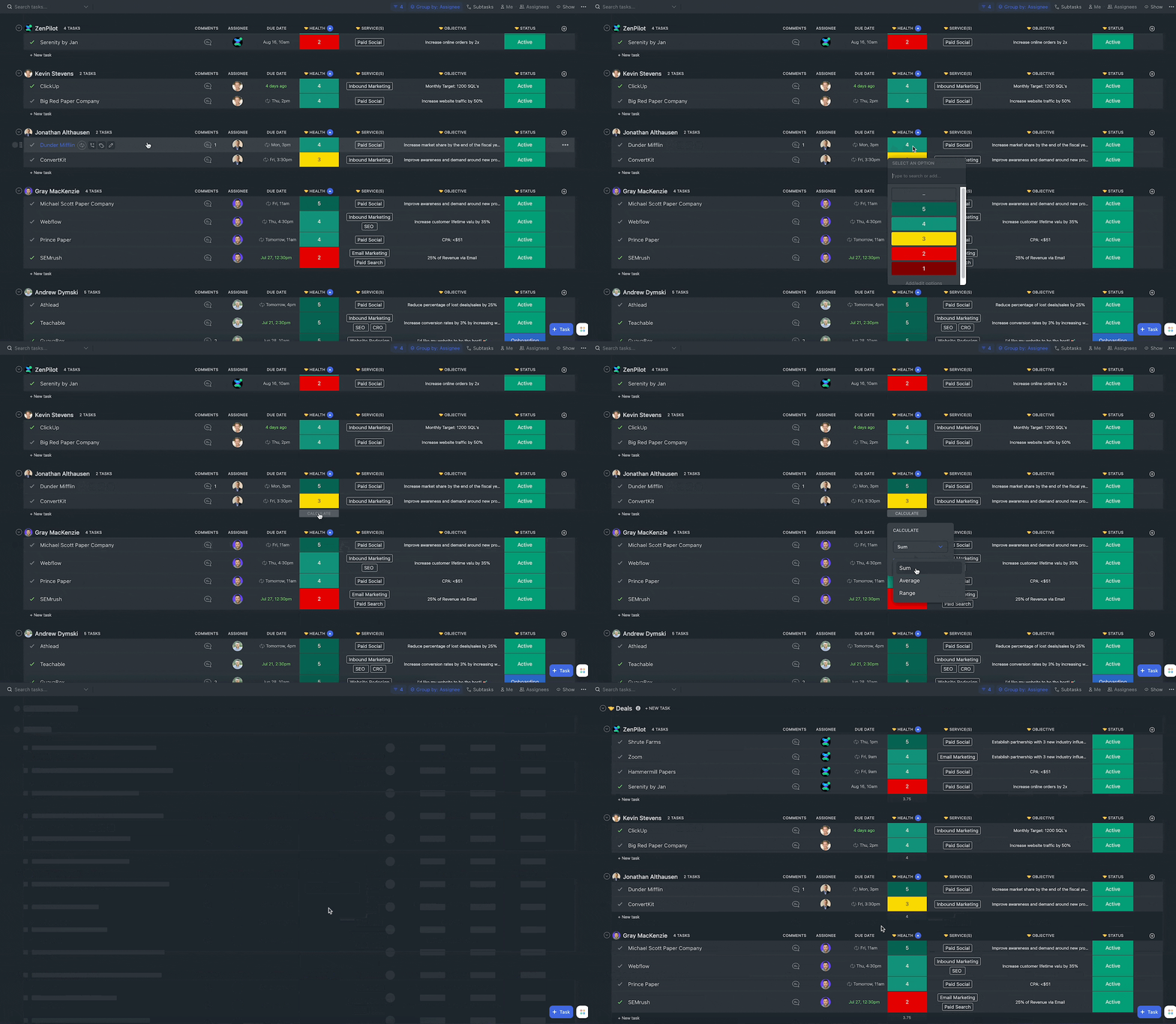
Our internal bar is simple: if we can’t build it in ClickUp, it can’t be done.
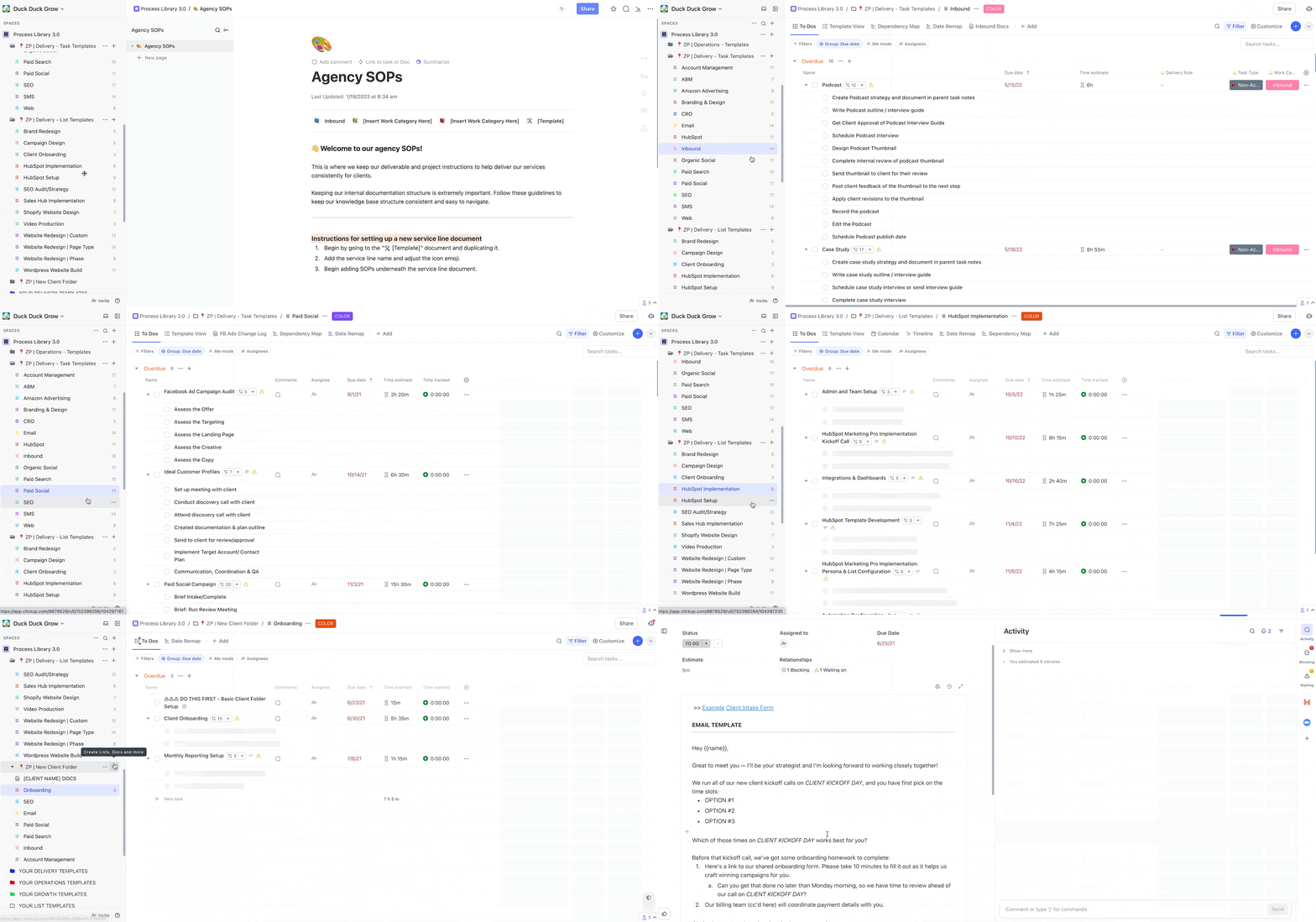
And every question we told you to ask a consultant, we’ll answer on a first call, including the ones about pricing. The success stories and Clutch reviews are there to check our math.
Talk to a ZenPilot Operations Expert
Book a free 30-minute call. You’ll get an assessment of your current workflow and prioritized recommendations, whether or not you ever hire us.
Book a Free Call →FAQ: Hiring a ClickUp Consultant
What does a ClickUp consultant do?
A ClickUp consultant designs, builds, and optimizes your ClickUp workspace to match how your team works: hierarchy design, workflows, custom fields, views, dashboards, automations, integrations, and team training. The best ones weight training and adoption as heavily as the build itself, because an unused workspace is worth exactly nothing.
How much does a ClickUp consultant cost?
It depends on the pricing model. Freelancers typically bill hourly for smaller tasks, while firms sell fixed-scope implementation packages. At ZenPilot, engagements start with the $5,000 Blueprint design phase, most full implementations run $15,000 to $30,000, and ongoing retainers start at $2,000/month. Most clients are fully operational within 60-90 days.
Is hiring a ClickUp consultant worth it?
For teams of 10+ with real complexity, usually yes. The cost of a broken workspace compounds weekly across every person on your team, and a proven implementation ends months of trial and error. For teams under 5 with simple workflows, DIY with a good guide is often the smarter move - start with our free ClickUp for Agencies guide before you spend anything.
What is a certified ClickUp consultant?
A ClickUp Verified Consultant is an individual certified through ClickUp’s official partner directory for demonstrated skill on the platform. Solutions Partners are firms in ClickUp’s formal partner program; ZenPilot became ClickUp’s first partner in 2018 and is its highest-rated Solutions Partner. Treat certification as a filter for your shortlist, then evaluate industry experience, methodology, and named client results.
Ready to Talk to a ClickUp Consultant?
If this post did its job, you now know what the work involves, what fair pricing looks like, and which questions expose a weak consultant in ten minutes.
When you’re ready to evaluate one for real, two doors:
Compare your options starting with our ClickUp consultant page - how we work, what it costs, and the guarantee behind it.
Or skip ahead and book a free 30-minute call. You’ll walk away with an honest assessment of your workspace and a prioritized fix list, and we’ll tell you plainly if you’re a DIY case. Worst case, you leave with a shorter list of things to worry about.